
By Václav Lorenc · CEO, Byzkids · Published October 2, 2026
Scam Protection in Banking Apps Blueprint: Stop Fraud In-App
How CEE and global banking apps stop scams: payee check UX, scam call detection, one-tap brakes and recovery. 33 proven concepts and FAQ.
Last updated 2 October 2026 · V1.1 · By Václav Lorenc, CEO, Byzkids · Reviewed by David Šimek, Managing Partner, Byzkids
Executive Summary
Short answer. Scam protection in banking apps is the customer-facing layer that stops fraud the customer would otherwise authorise: device-bound approval instead of SMS codes, warnings that read a live risk signal (payee name, an active phone call), a one-tap brake on all outflows and an in-app path to report and track a case. The best CEE and global apps organise it in five stages: Harden, Educate, Warn, Stop and Recover.
Situation
Fraud prevention is moving from the back office into the app screen. PSD3 and PSR make banks carry impersonation-fraud losses when a detected risk was not shown to the customer, and every non-euro CEE bank must offer Verification of Payee by 9 July 2027. EU credit transfer fraud reached EUR 2.2 billion in 2024, up 16% year on year, and instant payments leave seconds, not hours, to step in. Most CEE apps still answer with generic warnings that customers skip, SMS codes that scammers ask for, and a hotline after the money is gone.
Solution
Move scam protection to the screen where the customer decides, and run it as a five-stage Trust Loop. Harden the account before anything happens: app-based approval instead of SMS codes, alerts when a new device signs in, and lower limits outside trusted contexts. Educate and Warn with live signals instead of generic advice: a payee name check with a clear verdict, an alert when the customer is on a call while paying, and a way to ask the bank before paying. Stop the loss with a one-tap brake on all outflows and a verified line to the real bank. Recover by letting the customer report a scam from the transaction and see where the case stands.
How to read this blueprint
100%: what the strongest players already do. Proven concepts, ready to copy. Implement them well and you match the strongest players in the category.
130%: where we beat the market. Specific pain points and KPIs from the 100% set that Byzkids can push further for your context.
150%: where the market is heading. The trends and concepts that will define the next wave.
Key takeaways
- Warnings inside the transfer flow stop scams; generic security messages do not. Customers expect the bank to protect them and skip general advice.
- Every non-euro CEE bank (CZ, PL, HU, RO) must offer Verification of Payee by 9 July 2027, so the payee check verdict screen is the screen CEE banks will redesign first.
- Recover is the least developed stage: few apps show a scammed customer where their case stands, and PSD3 and PSR make that status part of the product.
Why Now: Fraud Losses and the 2027 CEE Deadline
EUR 2.2 billion in credit transfer fraud
EU credit transfer fraud reached EUR 2.2 billion in 2024, up 16% year on year, according to the joint EBA and ECB payment fraud report. Source: ECB, December 2025 →
9 July 2027: Verification of Payee in non-euro CEE
Under the Instant Payments Regulation, banks in non-euro member states must send instant euro transfers and offer Verification of Payee by 9 July 2027. Euro-area banks, including Slovakia and the Baltics, went live on 9 October 2025. Source: ECB →
Liability moves to the bank
PSD3 and the Payment Services Regulation reached political agreement in November 2025 and final texts in April 2026. Impersonation-fraud reimbursement becomes the norm, and the bank carries the loss where a detected payee mismatch was not shown to the payer. Source: Open Banking Tracker →
100%: Best Available Concepts on the Market
The Trust Loop follows a scam from before it starts to after it lands. Each stage opens with its pain point, then shows the patterns that solve it.
| Phase | Pain Point | Impact | Innovations |
|---|---|---|---|
| 1. Harden | Stolen codes and second devices still open the door to account takeover | A stolen password or unlocked phone is worth far less | 1.1 Security Health Check, 1.2 App-Based Approval Instead of SMS, 1.3 New-Device Takeover Alert, 1.4 Risk-Based Step-Up, 1.5 Context-Aware Limits |
| 2. Educate | Customers skip generic security messages and expect the bank to protect them | Customers recognise the live scam script when it reaches them | 2.1 Live Threat Push, 2.2 Homepage Scam Banner, 2.3 Scam Guides Where Money Is Lost, 2.4 Ask the Bank Before You Pay |
| 3. Warn | Instant payments leave seconds to stop a coached transfer | Scams are interrupted inside the transfer flow, before settlement | 3.1 Payee Name Check with a Clear Verdict, 3.2 On-Call Scam Detection, 3.3 In-Flow Scam Interruption, 3.4 Network Scam Signals |
| 4. Stop | During a scam, every minute in a hotline queue is money leaving | Customers halt outflows in seconds and reach the real bank safely | 4.1 One-Tap Emergency Brake, 4.2 Undo Window, 4.3 Verified Bank Contact, 4.4 Flagged Payment Reply |
| 5. Recover | Scammed customers get a hotline, then silence | The worst day with the bank becomes a guided, visible process | 5.1 Report from the Transaction, 5.2 Dispute Status Timeline |
1. Harden
Most account takeovers still start with an SMS code read out to a caller or an app paired on the fraudster's phone. Hardening removes the code, binds the app to one device and ties limits to context, so stolen credentials alone cannot move money.
1.1 Security Health Check: mBank, Erste Bank Austria
Protections the customer switched on are invisible, so nobody knows what is missing. A single screen lists each safeguard as done or open, with a fix button next to every gap, and turns security into a short to-do list. Customers close gaps themselves instead of discovering them after an attack.
What to copy:
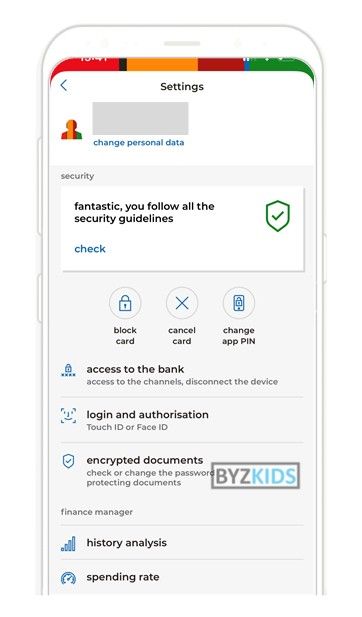
- mBank (PL): checklist of the bank's safety rules, from screen lock to push alerts
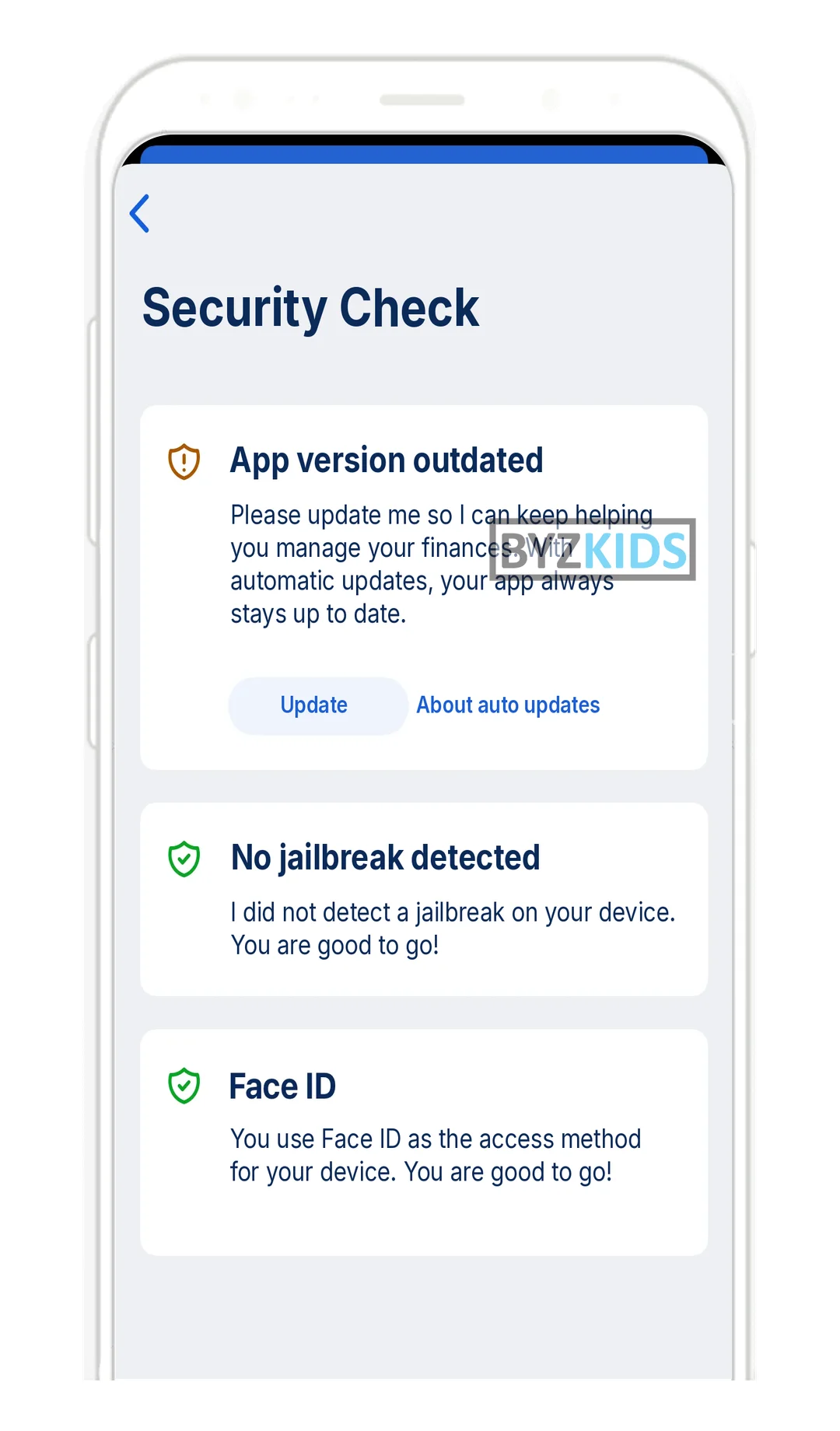
- Erste Bank Austria (AT): traffic-light device check: app version, jailbreak, screen lock, OS
Security checker showing banking safety rules compliance
by mBank
mBank POL offers a security checker that shows whether customers follow key mobile banking safety rules. It confirms completed protections, such as screen lock, push alerts, and mobile authorisation, turning invisible safeguards into visible reassurance. This builds trust and encourages safer app behaviour.
In-app device security audit with instant remediation
by Erste Bank Austria
Erste Bank Austria AUT launches an in-app Security Check feature within its George platform that audits five key device parameters: app version, jailbreak status, screen lock, download source, and operating system integrity. Each check surfaces a clear pass/fail status alongside a direct fix action, empowering users to remediate vulnerabilities instantly. The main differentiator is its proactive, user-facing security posture — closing device-level gaps before fraudsters can exploit them, rather than relying solely on backend detection.
1.2 App-Based Approval Instead of SMS: Macquarie, mBank
An SMS code is the one thing a scammer can ask the customer to read out. Moving every login, payment and account change to a device-bound push that shows what is being approved removes that attack, and SIM swaps stop working. Approval also gets faster than typing a code.
What to copy:
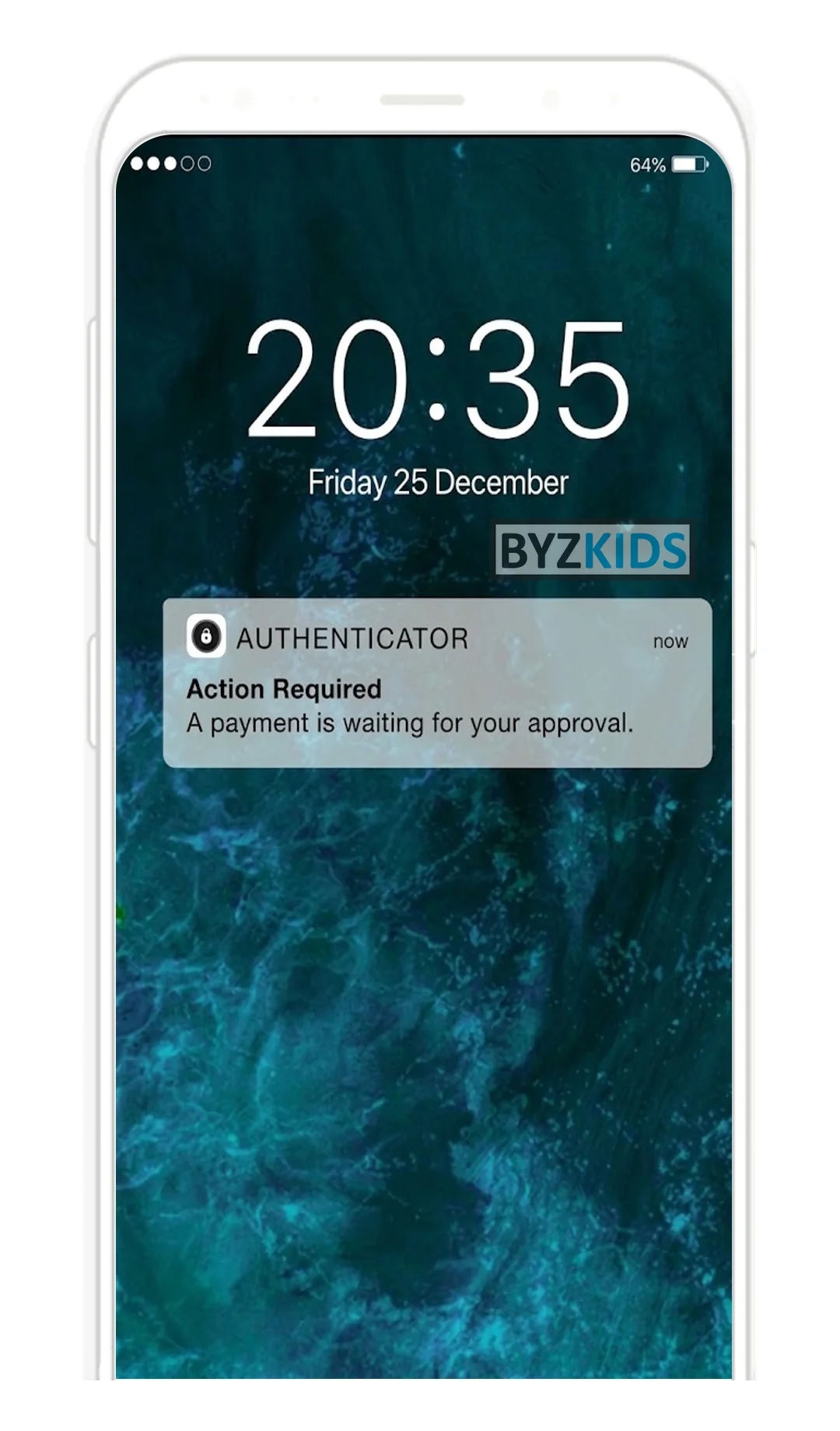
- Macquarie (AU): approve or deny payments and account changes in one tap, works abroad without signal
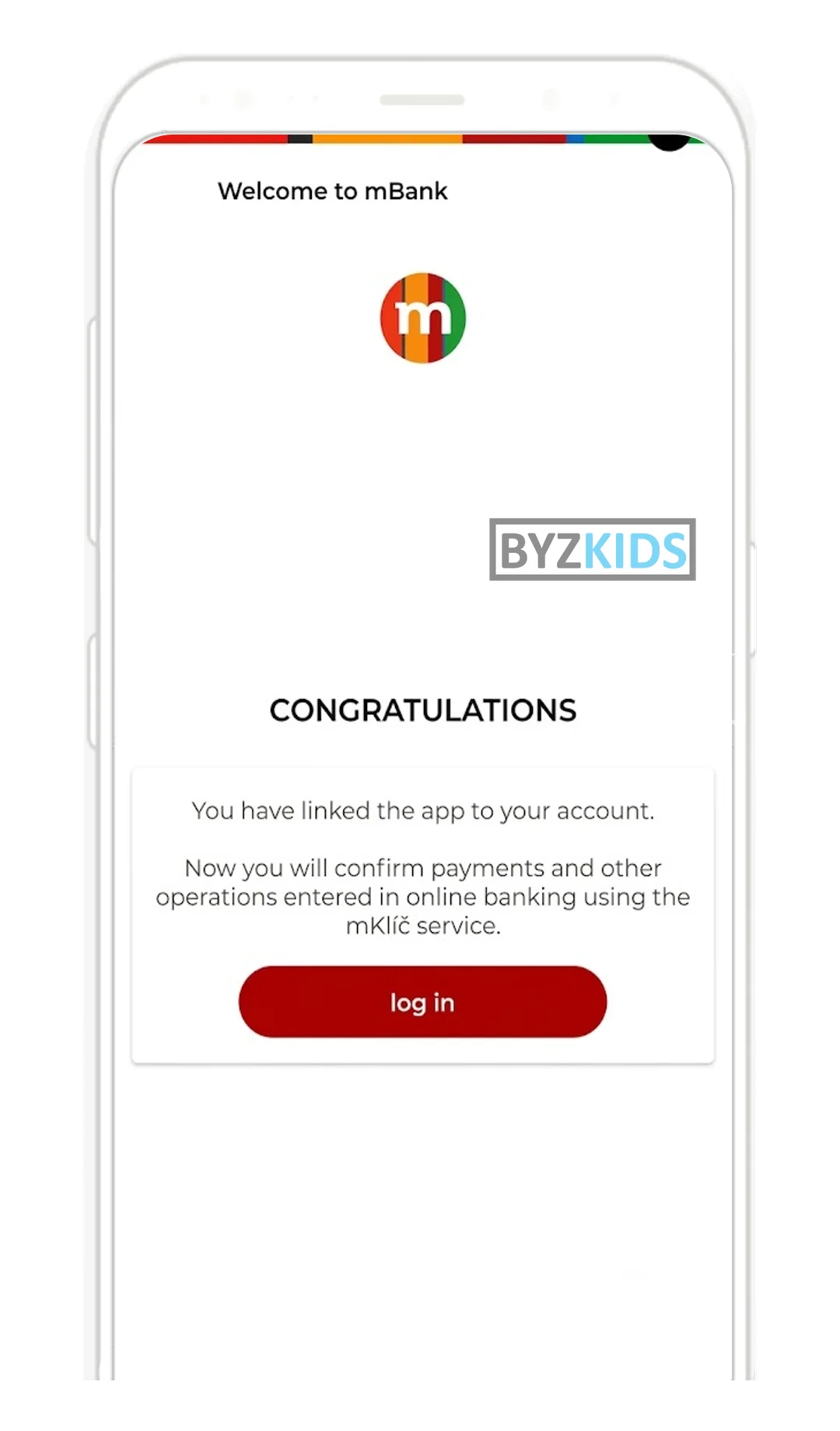
- mBank (CZ): pairing the app makes it the default approver, no separate opt-in step
Automatic mKlíč device pairing eliminates activation friction
by mBank
mBank CZE launches automatic mKlíč device pairing that instantly sets the mobile app as the primary verification method for internet banking. Upon successful pairing, users see a confirmation screen and are immediately ready to verify payments and operations without any additional opt-in step. The key differentiator is the elimination of a separate activation flow, reducing friction and streamlining the transition to app-based authentication.
Device-bound authenticator with tap approval notifications
by Macquarie
Macquarie AUS launches a dedicated authenticator app that delivers actionable push notifications allowing users to approve or deny payments and account changes with a single tap. The device-bound solution eliminates reliance on SMS one-time codes, functioning seamlessly even without cellular connectivity abroad. This approach shifts transaction authorization control directly to the customer while significantly reducing SIM-swap and SMS interception fraud risks.
1.3 New-Device Takeover Alert: mBank, Bunq
A takeover needs the account on a second phone. When the owner is told the moment pairing starts, and only one device can be active at a time, the attack surfaces while it can still be stopped.
What to copy:
- mBank (CZ): instant push the moment pairing starts on another device
- Bunq (NL): one active device only; a new phone needs a selfie to take over
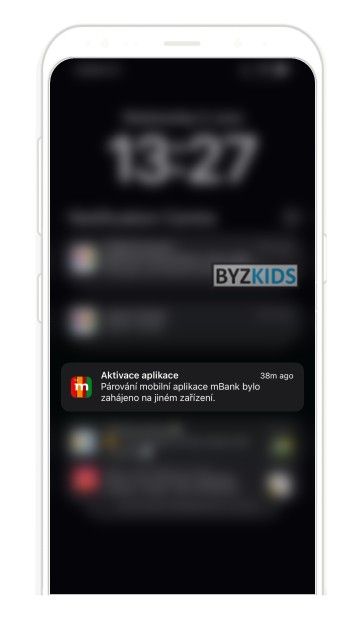
Instant pairing attempt push notifications
by mBank
mBank CZE sends an instant push notification when mobile app pairing is initiated on another device. This real-time warning alerts users to potential unauthorized access. The immediate visibility creates a strong sense of control and helps prevent account takeovers.
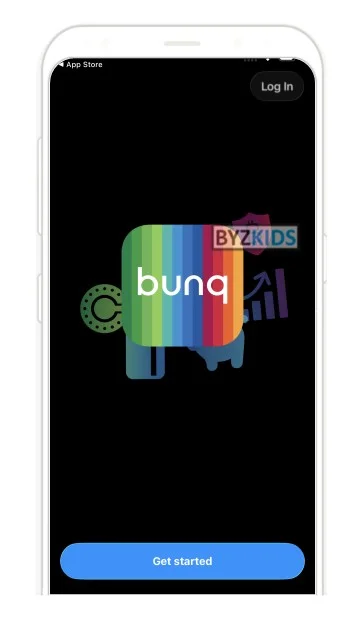
Selfie biometric login replaces device recovery flow
by Bunq
Bunq NLD lets users log in on a new device with just their phone number, security code, and a quick selfie. Biometric re-identification replaces lengthy recovery flows and only one mobile device can be active at a time, keeping account access simple while protecting against takeover.
1.4 Risk-Based Step-Up: Bank Pekao
Adding checks to every transfer trains customers to click through. Step-up that fires only when the way the customer types and moves stops matching their profile puts the friction where the losses are and leaves everyday payments untouched. Bank Pekao (PL) lets customers opt in to this behavioural protection in PeoPay settings.
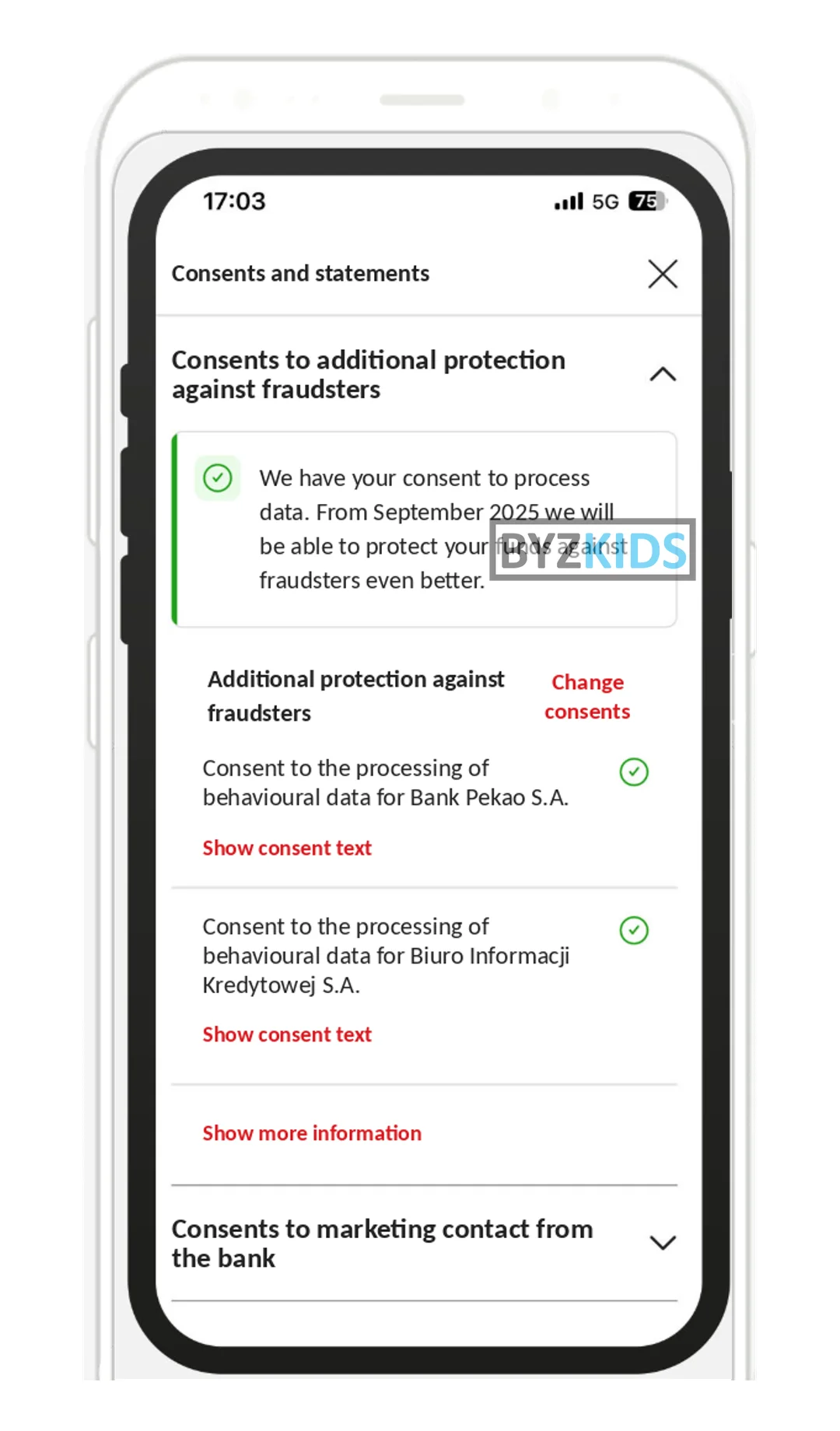
Continuous behavioural biometrics session protection
by Bank Pekao
Bank Pekao POL launches opt-in behavioural biometrics protection within its PeoPay app that continuously learns each user's unique typing patterns and navigation gestures. Suspicious sessions that deviate from the established behavioural profile are automatically paused and subjected to additional verification. Unlike credential-based security, the system identifies impostors without introducing friction into everyday banking interactions.
1.5 Context-Aware Limits: Nubank
Street theft and coached transfers both happen away from home. When the customer marks trusted Wi-Fi networks, payments above a lower limit made elsewhere need a face check, and a stolen unlocked phone can no longer empty the account on the spot. Nubank (BR) runs this as Street Mode, used by over 5 million customers.
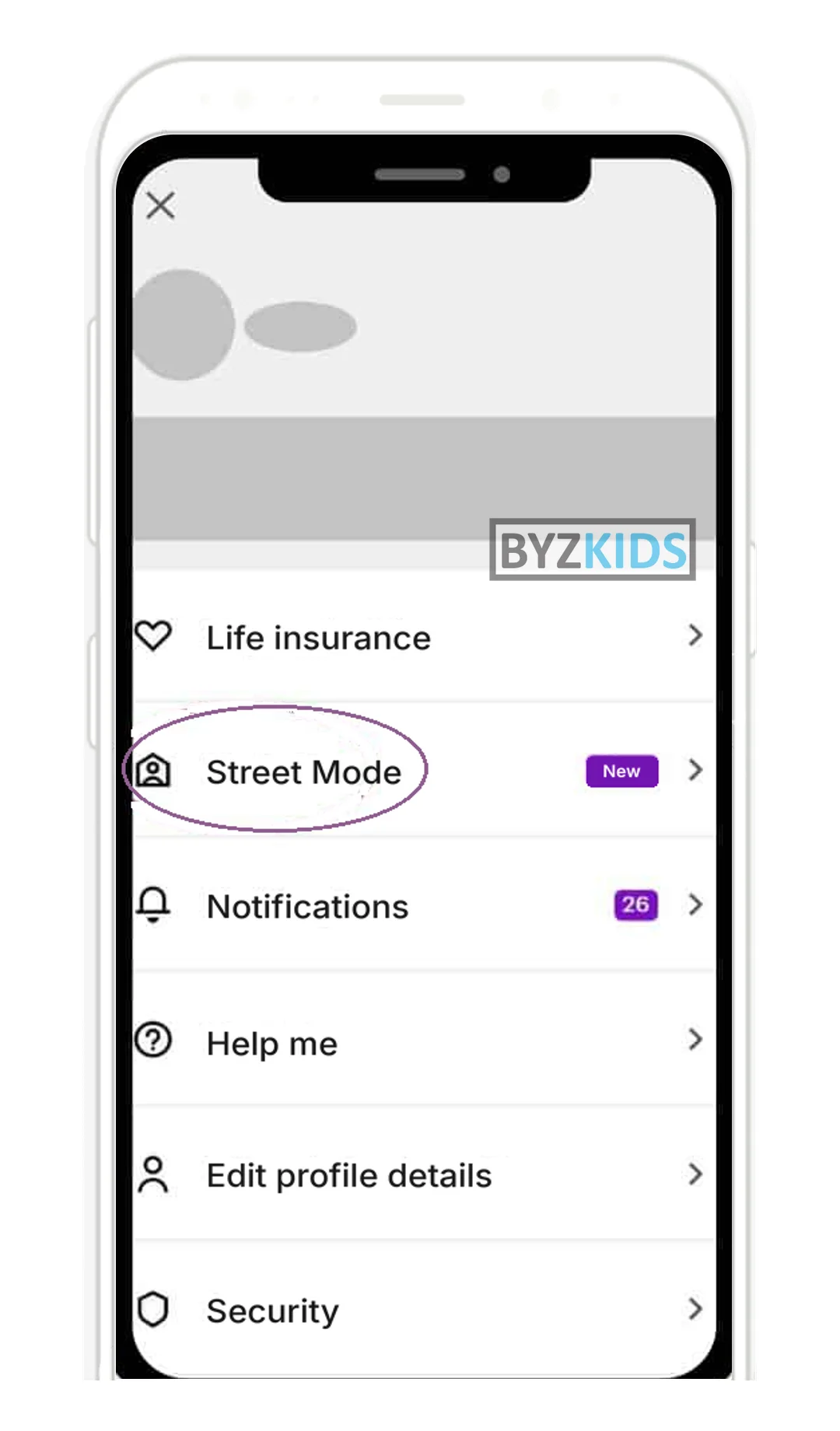
Context-aware transaction limits with facial recognition
by Nubank
Nubank BRA launches Street Mode, a security feature that automatically enforces lower transaction limits for Pix payments, transfers, and bill payments when users are outside trusted Wi-Fi networks. Any larger transaction attempted away from home requires facial recognition to proceed. The feature significantly reduces the risk of financial loss from a stolen unlocked device by tying spending power to physical context.
2. Educate
Customer research across the banks we have benchmarked is blunt: most people expect the bank to protect them and ignore generic security messages. Education works when it covers one live threat, shows the real scam script and meets the customer on the lock screen, the homepage or the marketplace they use.
2.1 Live Threat Push: UniCredit, Moneta
Security newsletters arrive after the wave has passed. A short push on each active scam wave, readable on the lock screen and linked to full guidance in the app inbox, lands before the scammer calls, so the customer recognises the script instead of hearing it for the first time.
What to copy:
- UniCredit (CZ): 'Beware of fraudsters' push before the wave, full guidance in the in-app inbox
- Moneta (CZ): one push per threat: phishing wave, scam calls, fake websites
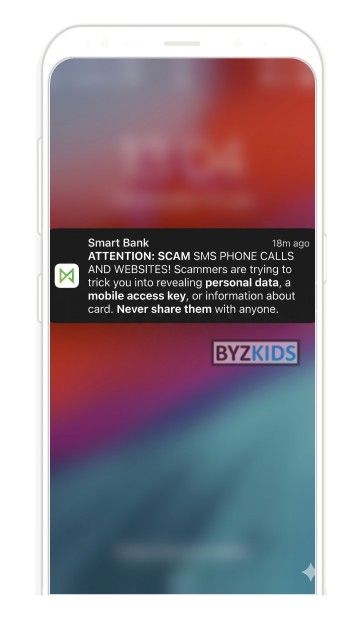
Proactive push alerts for phishing scams
by Moneta
Moneta CZE sends proactive push alerts that warn customers about ongoing phishing, scam calls, and fake websites. It brings fraud prevention outside the app and into the moment, making threats hard to miss. This boosts awareness and helps users protect sensitive banking details before it is too late.
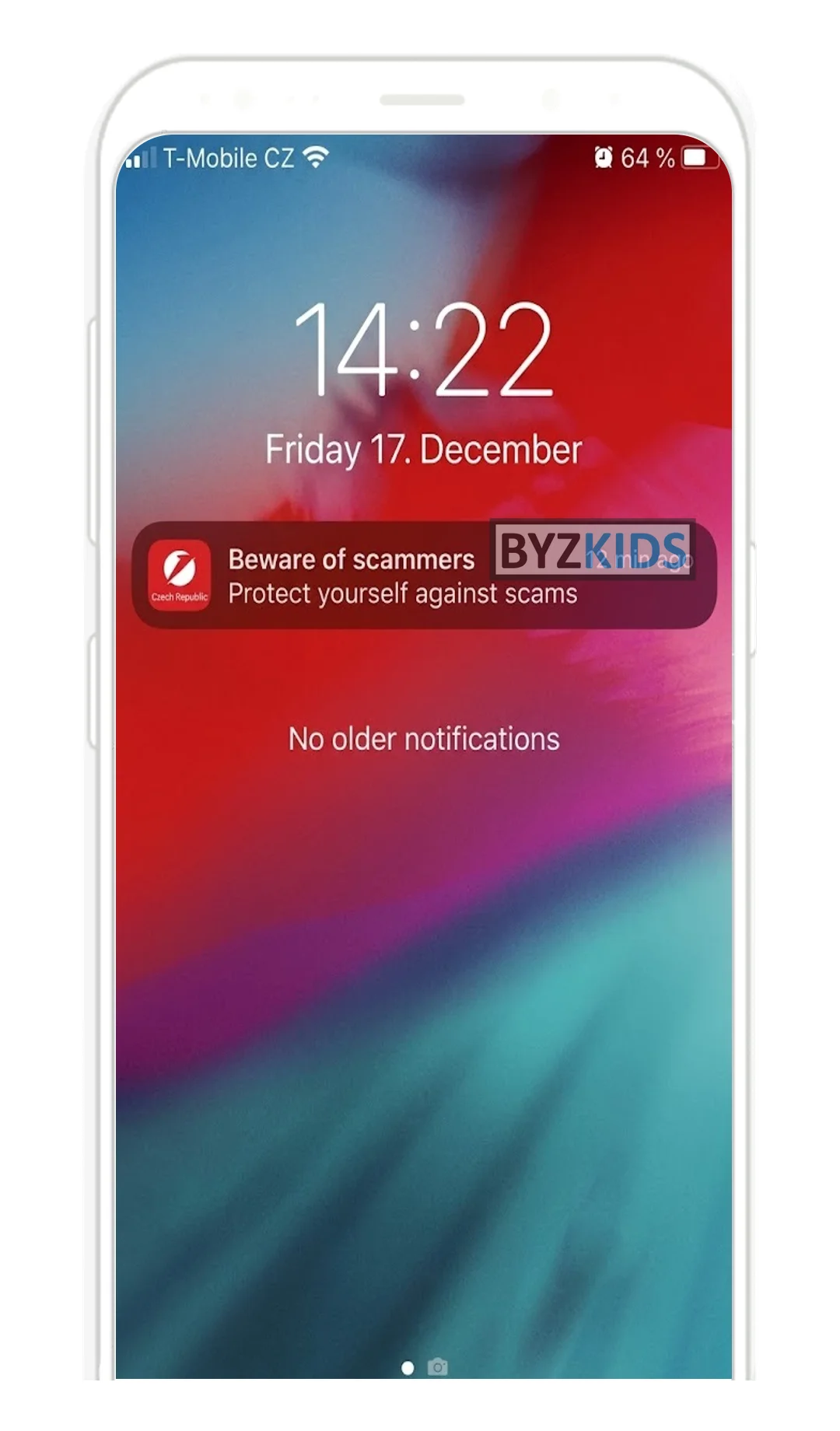
Proactive pre-emptive fraud and phishing push alerts
by UniCredit
UniCredit CZE launches proactive push notifications that warn users about active online fraud and phishing threats before a scam attempt reaches them. Alerts appear either as a concise 'Beware of fraudsters' headline or as a longer message directing users to the Smart Banking in-app inbox for full safety guidance. The key differentiator is the pre-emptive, awareness-first approach — intervening upstream rather than reacting after fraud has already occurred.
2.2 Homepage Scam Banner: ČSOB
The homepage is the one screen every customer sees daily. A banner naming a single current scenario, such as a fake marketplace payment link, with one clear action, catches the risky payment before it starts. ČSOB (CZ) rotates situational scam banners with strong visual cues directly on the app homepage.
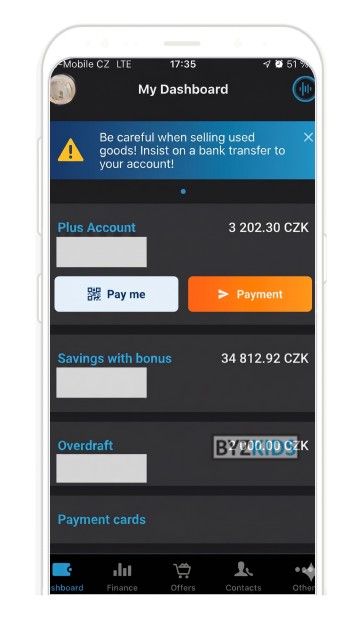
Fraud warning banners with situational advice
by ČSOB
ČSOB CZE uses homepage banners to warn users about specific fraud scenarios like unsafe marketplace payments. It delivers clear, situational advice with strong visual cues, making risks instantly understandable. This helps prevent scams by influencing behavior at the right moment.
2.3 Scam Guides Where Money Is Lost: Raiffeisenbank, ANZ Plus
Generic advice does not match what customers face on Vinted or in a chat with a fake buyer. Guides that spell out the attacker's script for the channels customers actually use, with a 'been scammed' path first, make the fraud recognisable in the moment.
What to copy:
- Raiffeisenbank (CZ): marketplace scam guide with the attacker's tricks and clear do's and don'ts
- ANZ Plus (AU): scam hub that opens with 'What can I do if I've been scammed?'
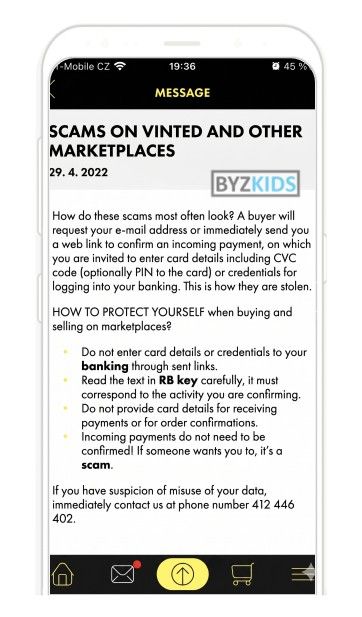
In-app marketplace fraud guidance and prevention
by Raiffeisenbank
Raiffeisenbank CZE shows in-app fraud guidance focused on scams on marketplaces like Vinted and other bazaars. It explains common attacker tricks and gives clear do’s and don’ts in plain language. This helps customers spot fraud earlier and avoid risky actions.
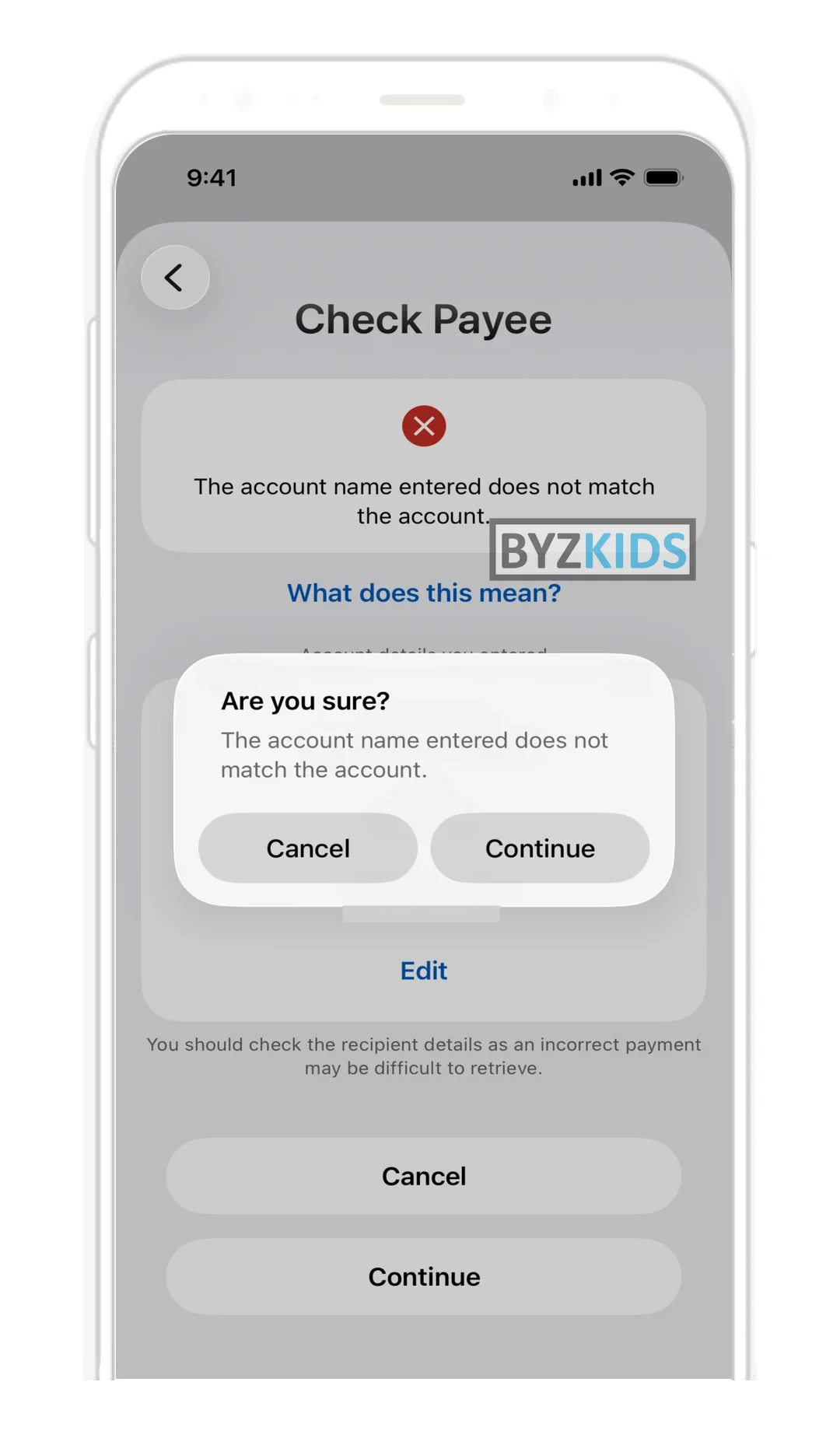
Real-time payee name verification before transfer
by ANZ
ANZ Plus (AUS) launches real-time payee name verification that cross-checks the recipient's name against the destination account before any transfer is processed. When a mismatch is detected, a prominent red warning is displayed and users must complete a second confirmation step to proceed. This friction-by-design approach targets misdirected payments and impersonation fraud before funds leave the account.
2.4 Ask the Bank Before You Pay: Starling Bank
Purchase scams are decided while browsing, before any payment exists. Letting customers upload an ad, product photo or seller chat and get an instant AI read of scam signs moves the check to the moment of doubt. Starling Bank (UK) runs this as Scam Intelligence, built on Google Gemini.
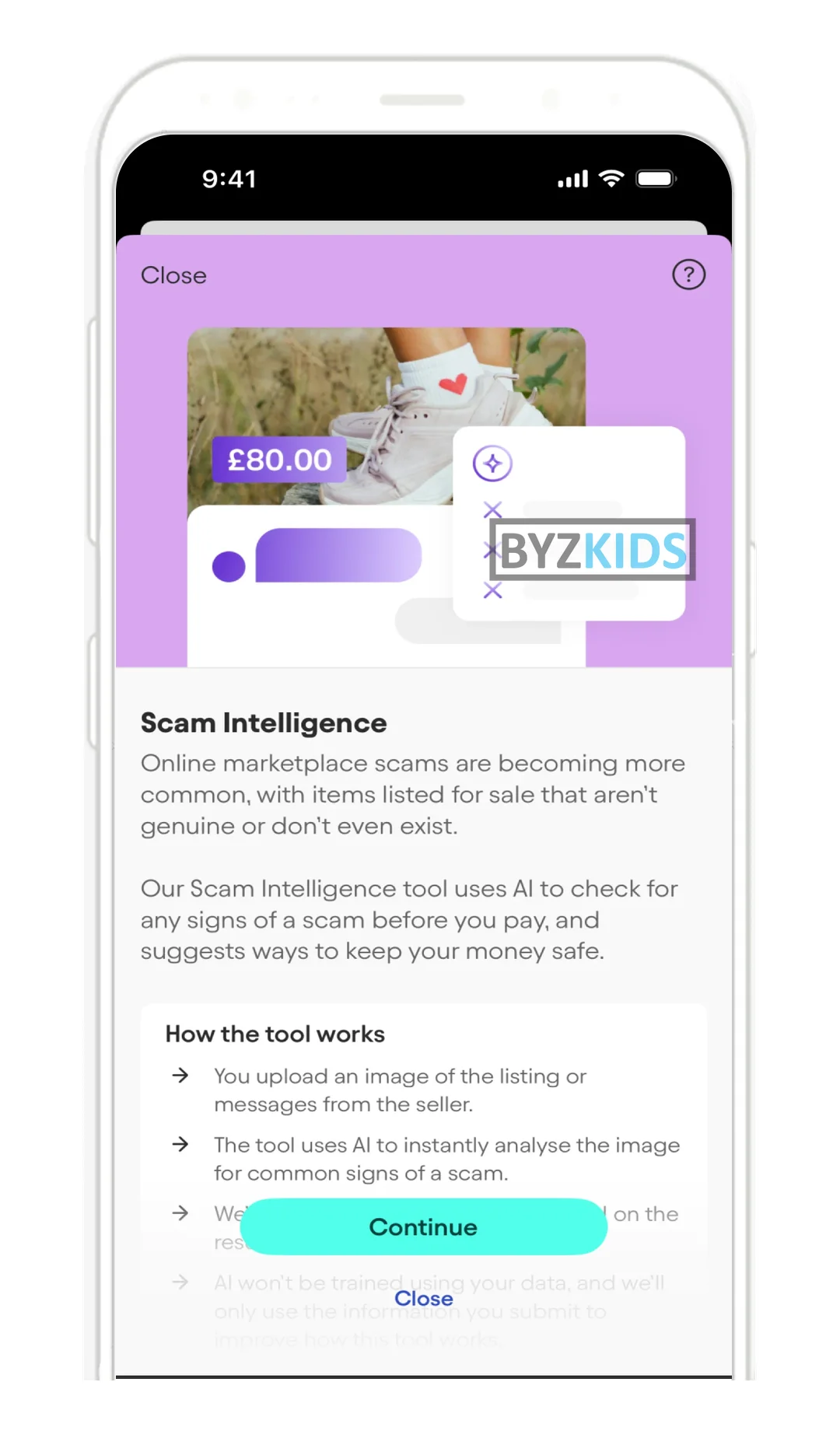
AI scam analysis of marketplace listings before payment
by Starling Bank
Starling Bank GBR launches Scam Intelligence, a Gemini-powered feature that allows users to upload marketplace listings or seller chats for instant AI-driven scam analysis before completing a payment. The tool intervenes at the critical moment of doubt, scanning for common fraud signals in real time. This proactive approach shifts scam protection upstream, reducing financial losses from online marketplace fraud.
3. Warn
Instant payments compress the decision window from hours to seconds, so post-settlement review no longer protects the customer. The strongest warnings read a live signal, such as the payee name, an active phone call or the payment purpose, and answer it with a specific message that is hard to skip.
3.1 Payee Name Check with a Clear Verdict: ANZ Plus, Monzo
The payee name check is the screen every non-euro CEE bank must ship by July 2027. The best versions return a plain verdict, show why the name does not match and make overriding a mismatch a deliberate second step with a forced pause, so misdirected and impersonation payments stop before sending.
What to copy:
- ANZ Plus (AU): red 'does not match' verdict, override needs a second confirmation
- Monzo (UK): 'Continue anyway' stays locked behind a 4-second countdown
Real-time payee name verification before transfer
by ANZ
ANZ Plus (AUS) launches real-time payee name verification that cross-checks the recipient's name against the destination account before any transfer is processed. When a mismatch is detected, a prominent red warning is displayed and users must complete a second confirmation step to proceed. This friction-by-design approach targets misdirected payments and impersonation fraud before funds leave the account.
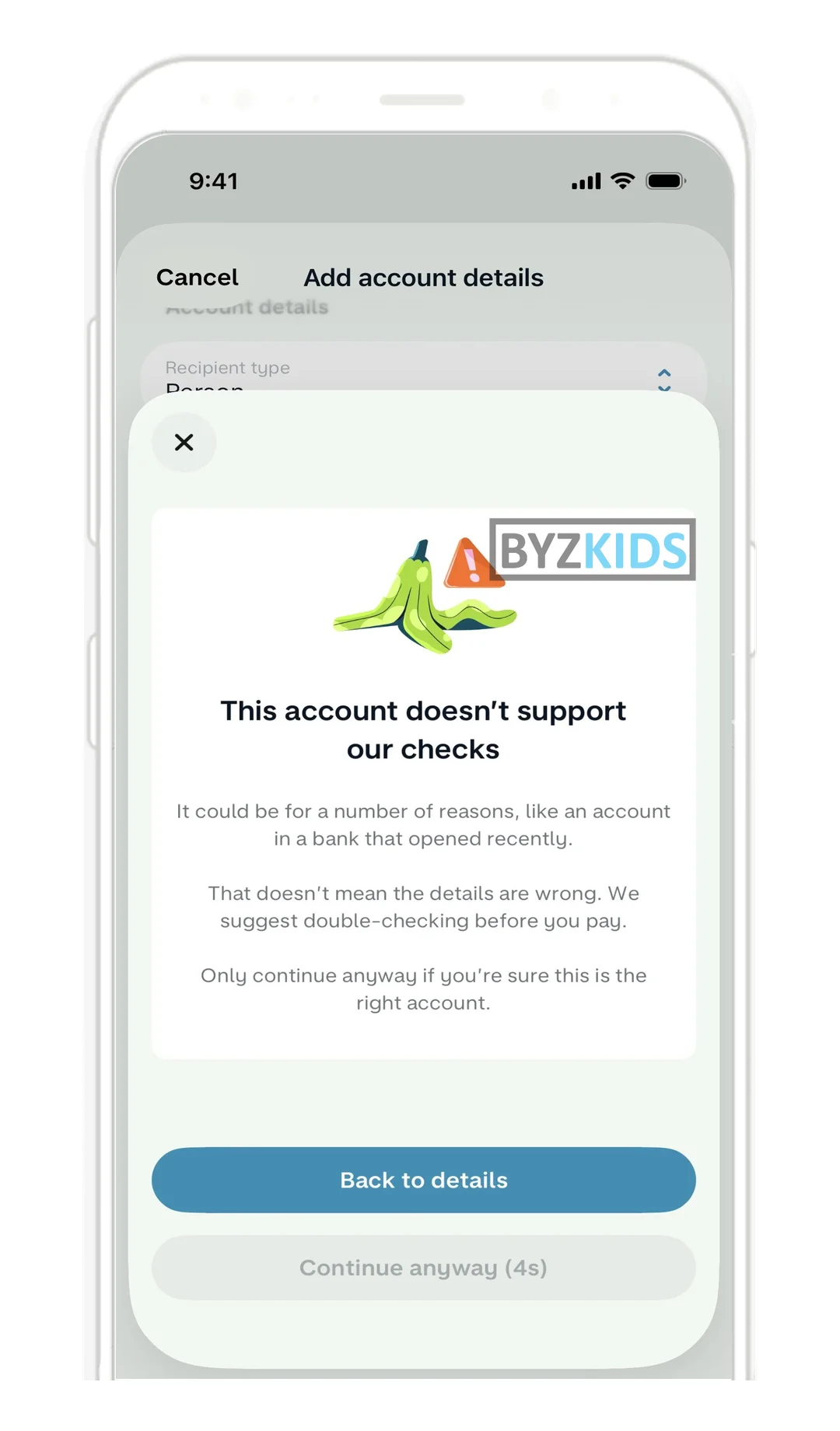
Countdown timer locks high-risk payment warning
by Monzo
Monzo GBR launches a friction-based safety mechanism that alerts users when a new payee's bank cannot verify the account name and temporarily locks the 'Continue anyway' button behind a mandatory countdown timer. The forced pause interrupts autopilot behaviour at the highest-risk moment in a payment flow, compelling users to actively read the warning before proceeding. The key differentiator is the deliberate UX friction design — turning a dismissible warning into an enforced decision point to reduce authorised push payment fraud.
3.2 On-Call Scam Detection: Revolut, mBank, Starling Bank
Impersonation scams run on a live phone call. When the app notices an active call at a risky moment and says plainly that the bank is not on the line, the caller loses credibility mid-script, including callers using cloned voices.
What to copy:
- Revolut (LT): 'Revolut is not calling you' banner when the app opens during a call
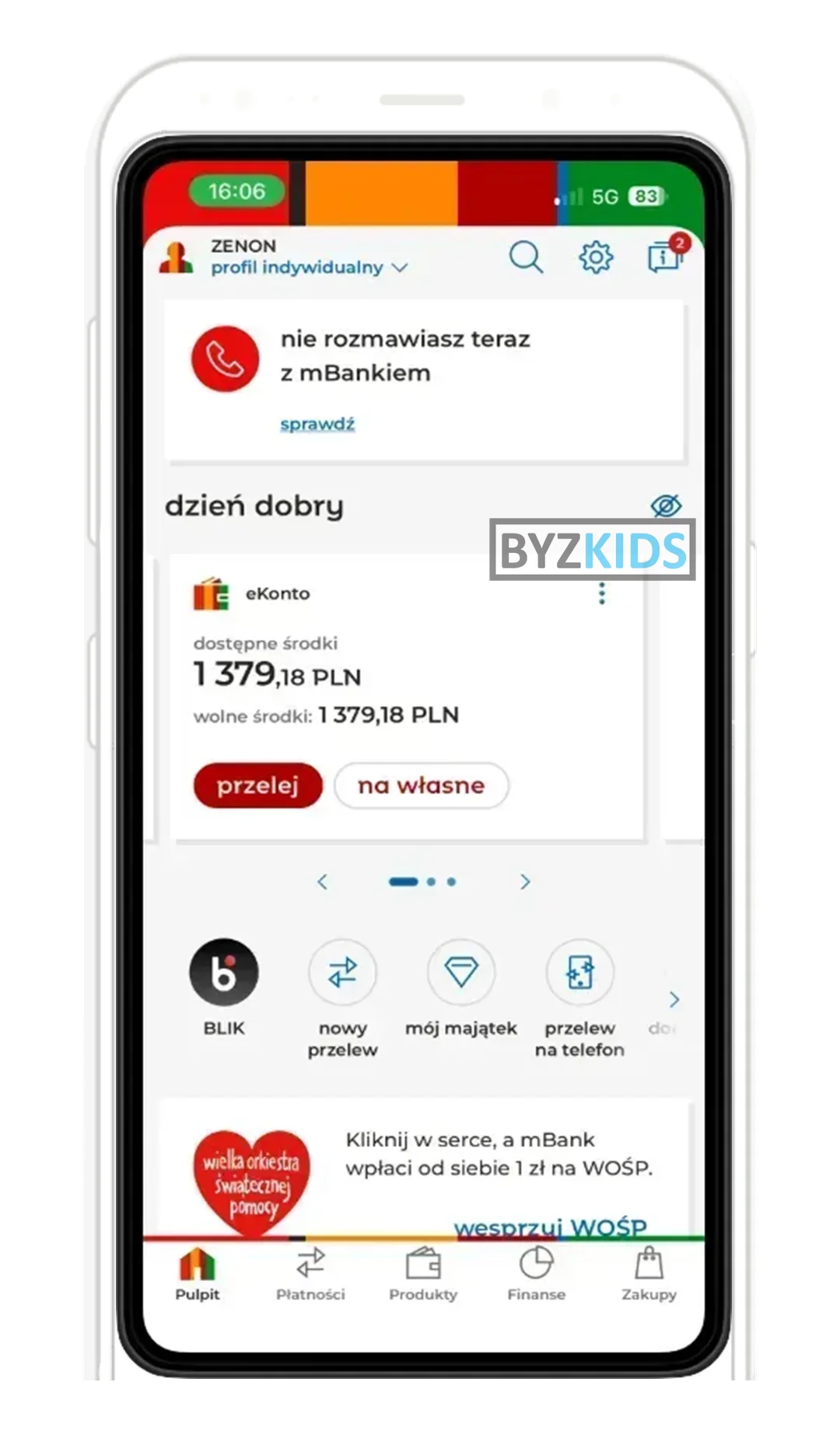
- mBank (PL): 'you are not talking to mBank' only at big transfers and loan applications
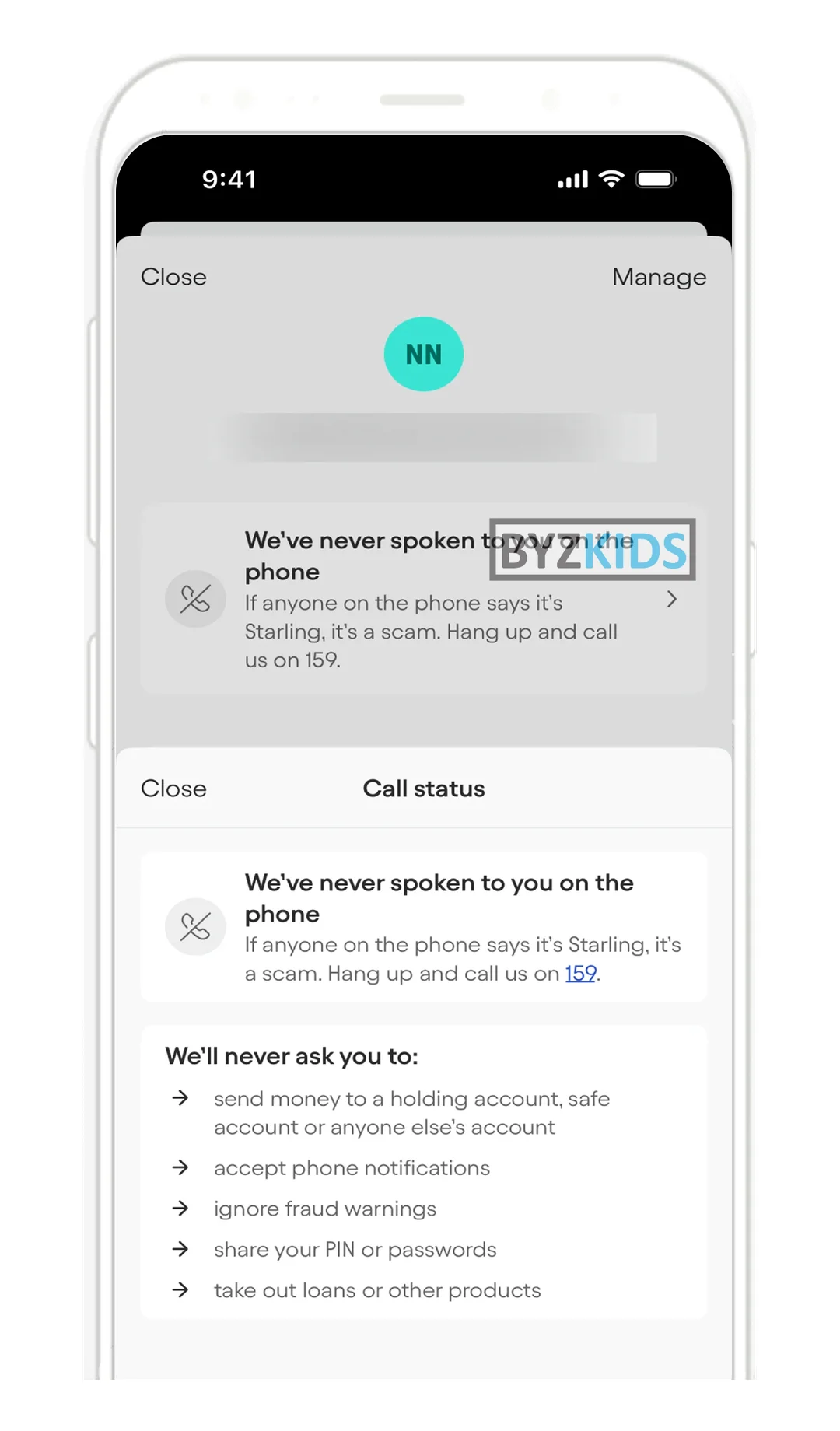
- Starling Bank (UK): 'we've never spoken to you' on the payee screen, plus what the bank never asks
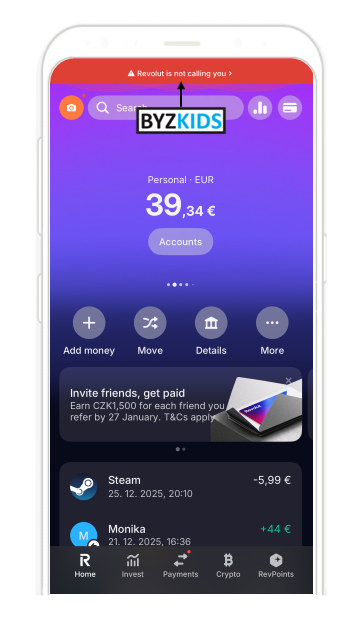
Real-time scam call detection banner
by Revolut
Revolut GBR flags potential scam scenarios with a real-time in-app banner like “Revolut is not calling you” when users open the app during a call. Instant reporting of suspicious numbers strengthens protection, creating a powerful, contextual defense that actively prevents fraud.
Real-time scam detection during active phone calls
by mBank
mBank POL launches an in-app scam detection mechanism that identifies when a user is on an active phone call while initiating a large transfer or loan application, immediately displaying a warning that mBank is not the caller. Legitimate mBank employee calls are verified by surfacing the employee's credentials directly in the app, neutralizing impersonation scripts mid-conversation. The feature targets social engineering attacks where fraudsters pose as bank representatives to authorize fraudulent transactions.
Contextual anti-fraud alert at payment initiation
by Starling Bank
Starling Bank GBR launches a contextual anti-fraud alert displayed directly on the payee screen, reminding customers that the bank has never contacted them by phone. The feature includes a 'call status sheet' listing actions Starling will never request — such as moving money to a 'safe account' — and names the specific scam type at the exact moment a transfer is initiated. The main differentiator is the precision timing of the warning: appearing at the highest-risk moment in the payment journey rather than in a generic security settings menu.
3.3 In-Flow Scam Interruption: Revolut, Moneta, Zing
A banner is easy to scroll past. A full-screen, scenario-specific checkpoint inside the payment, matched to the payment purpose and with stopping as easy as continuing, interrupts the coached payment at the last responsible moment.
What to copy:
- Revolut (LT): 'safe account' and risk-signal education inside the transfer flow
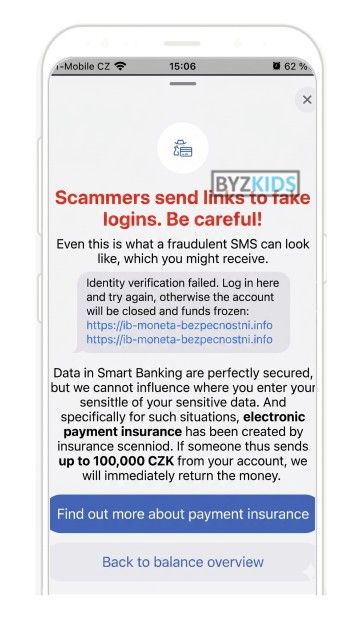
- Moneta (CZ): full-screen overlay names the scam and offers one-tap help
- Zing (UK): 'Stop this payment' is a full button; continuing needs a risk tick box
Fraud prevention overlays with scam warnings
by Moneta
Moneta CZE uses full-screen overlays to put fraud prevention in front of customers before they act. The message names a specific scam, explains the risk in plain language, and offers one-tap help. This makes warnings harder to ignore and improves customer safety.
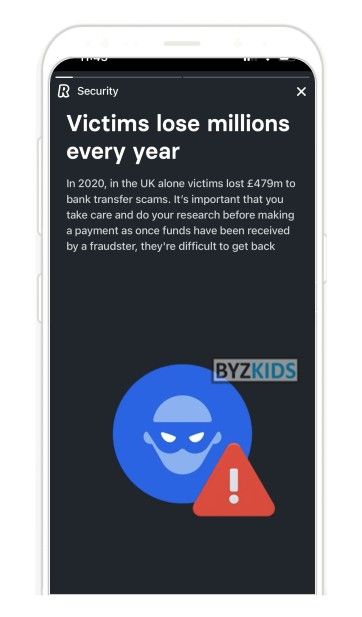
Live fraud education in transaction flows
by Revolut
Revolut GBR launched a new security awareness campaign directly inside transaction flows. It warns users with contextual scam messages, risk signals, and “safe account” alerts before money is sent. This turns fraud education into a live payment safeguard that can stop losses in time.
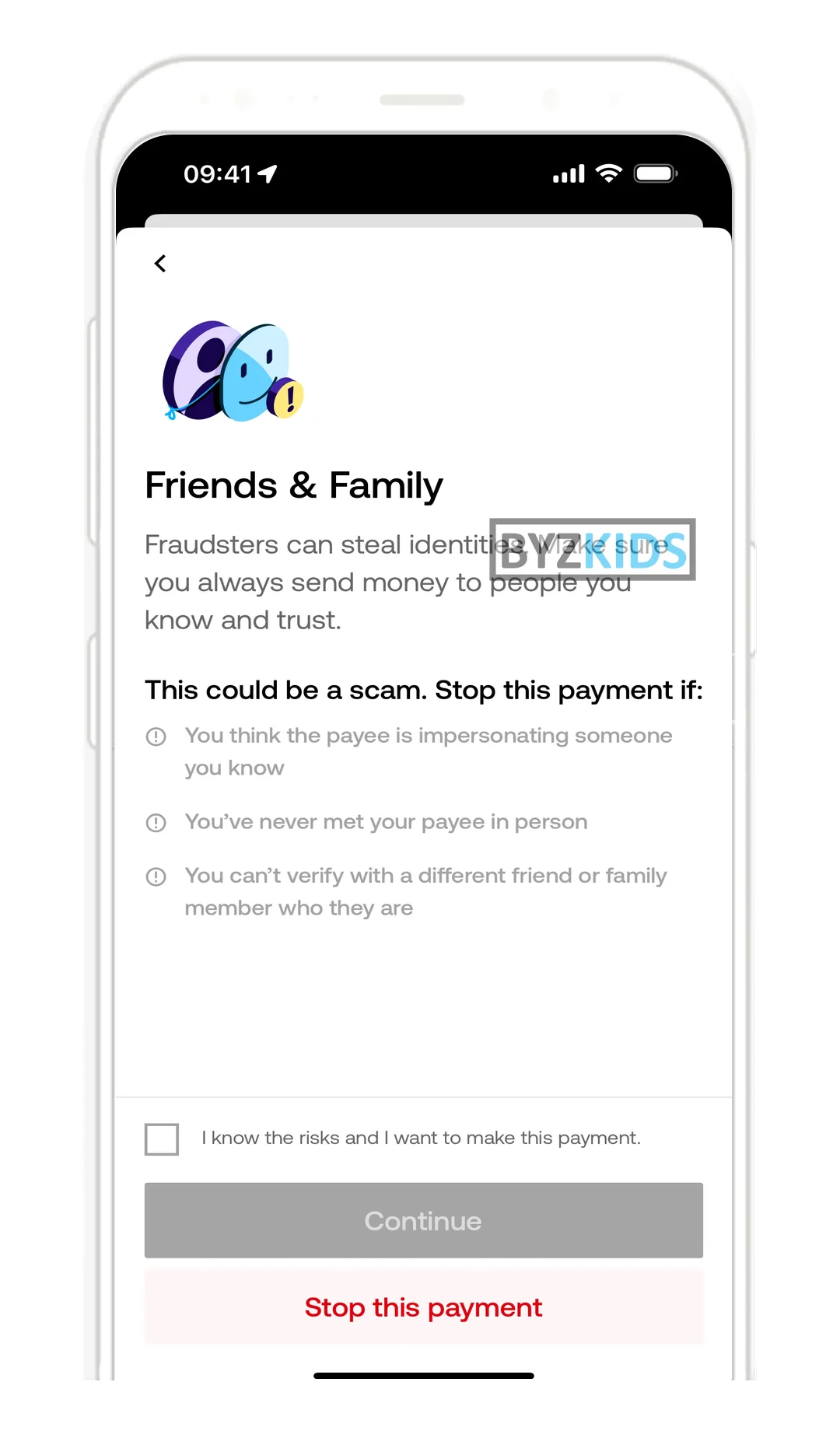
Asymmetric scam checklist before friend transfers
by Zing
Zing GBR launches a pre-payment scam awareness checklist that surfaces red flags — such as 'payee never met in person' — before any friends and family transfer is completed. The flow is deliberately asymmetric: cancelling the payment is a single prominent button, while proceeding requires the user to actively tick a risk acknowledgement checkbox. This friction-by-design approach shifts the cognitive burden onto the moment of highest vulnerability, nudging users away from authorised push payment fraud without blocking legitimate transfers.
3.4 Network Scam Signals: Truecaller
Many scams can be spotted before the customer answers the phone. Crowd-reported and network data label scam numbers on the incoming call screen, so the customer hangs up before the script starts. Truecaller (SE) shows 'Scammer' labels and community comments on unknown numbers; banks can partner with such filters or with telcos.
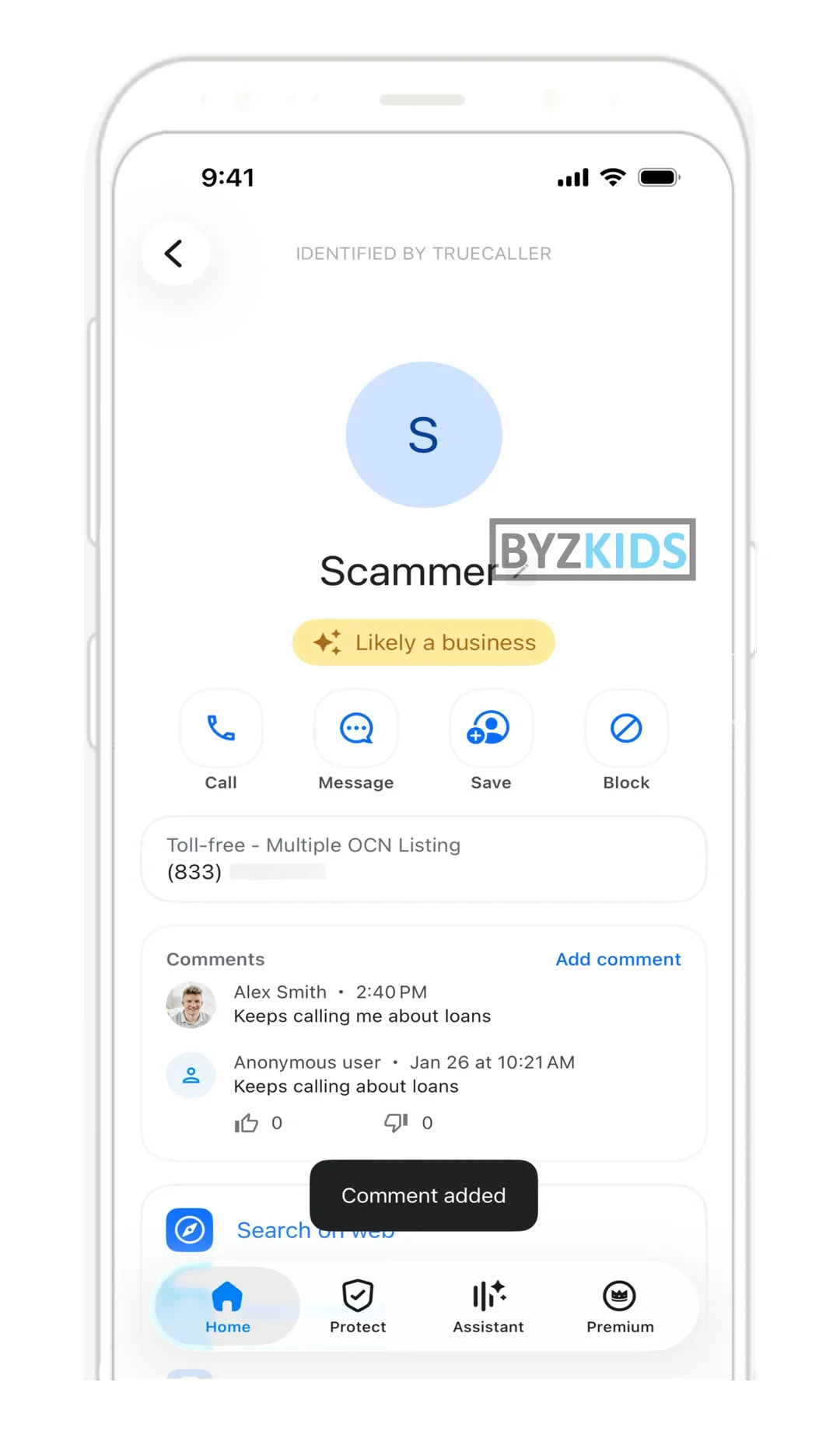
Real-time crowd-sourced scam call identification screen
by Truecaller
Truecaller SWE launches real-time scam call identification powered by crowd-sourced community reports displayed directly on the incoming call screen. The feature labels unknown numbers as likely scammers and surfaces comments from other users who have previously received calls from that number. By turning every user into an early warning sensor, the system creates a continuously updated, community-driven fraud detection layer that helps users make informed decisions before answering or engaging.
4. Stop
When a scam is under way, the customer needs one action that works now, not a phone number. The best apps give a single brake on all outflows, a short undo window, a one-tap answer to a fraud alert and a way to prove every genuine bank call.
4.1 One-Tap Emergency Brake: mBank, Wise
Blocking card by card and channel by channel takes too long under pressure. One button that freezes all new outflows, cards and sessions at once, while scheduled bills keep running and the account stays visible, stops the loss in seconds.
What to copy:
- Wise (UK): kill switch logs out every device, freezes cards and cancels pending payments
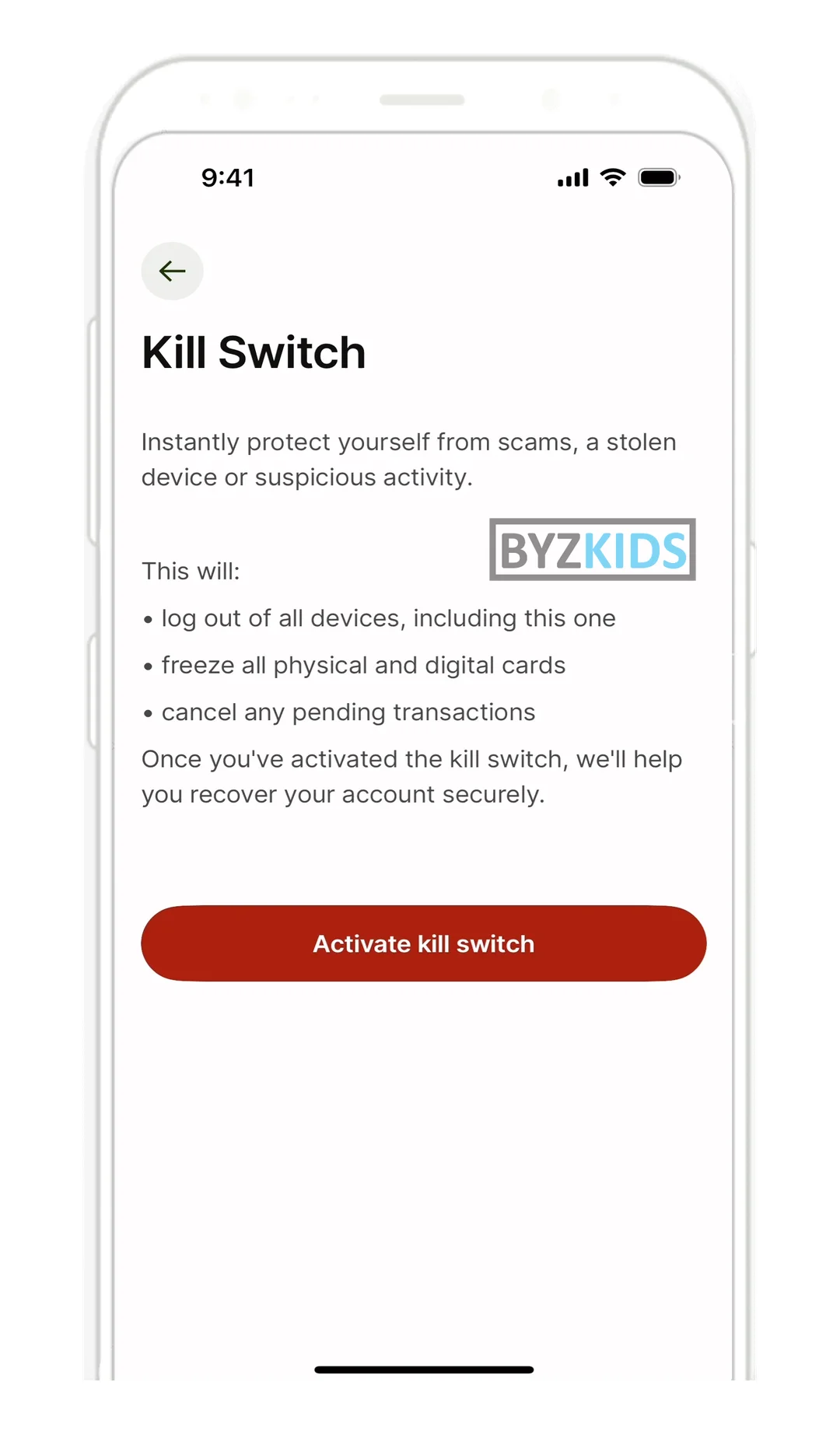
Kill Switch: instant freeze all accounts one tap
by Wise
Wise GBR launches a Kill Switch feature that instantly logs out all devices, freezes every linked card, and cancels pending transactions in a single tap. The tool is designed to protect users in high-stress scenarios such as scams, stolen phones, or suspicious account activity. Its key differentiator is the unified, immediate control it gives users before they even need to contact customer support.
4.2 Undo Window: Monzo
Pressured customers often realise the mistake seconds after sending. A customer-set window of 10 to 60 seconds, shown as a countdown ring in the feed, lets them pull the transfer back before it leaves. Monzo (UK) offers this as Undo payments.
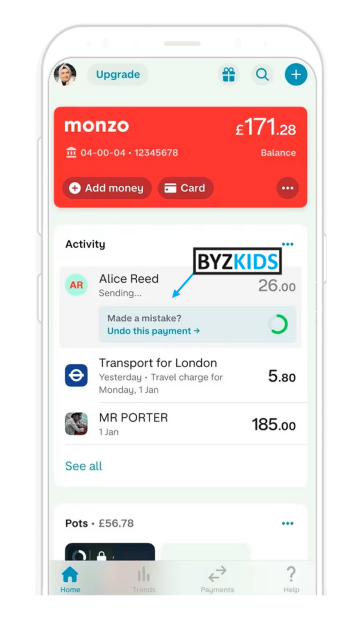
Undo payment
by Monzo
Monzo GBR introduced an undo payment feature allowing users to cancel sent transactions instantly via a visible prompt, helping avoid mistakes and improving control over outgoing payments.
4.3 Verified Bank Contact: Erste Bank Hungary, ING Bank Śląski, mBank
Caller ID and SMS can be spoofed; the bank's own app cannot. Pairing every genuine outbound call with an in-app notice, and routing urgent calls through the app with authentication already done, lets customers confirm a real banker in seconds and drop the fakes.
What to copy:
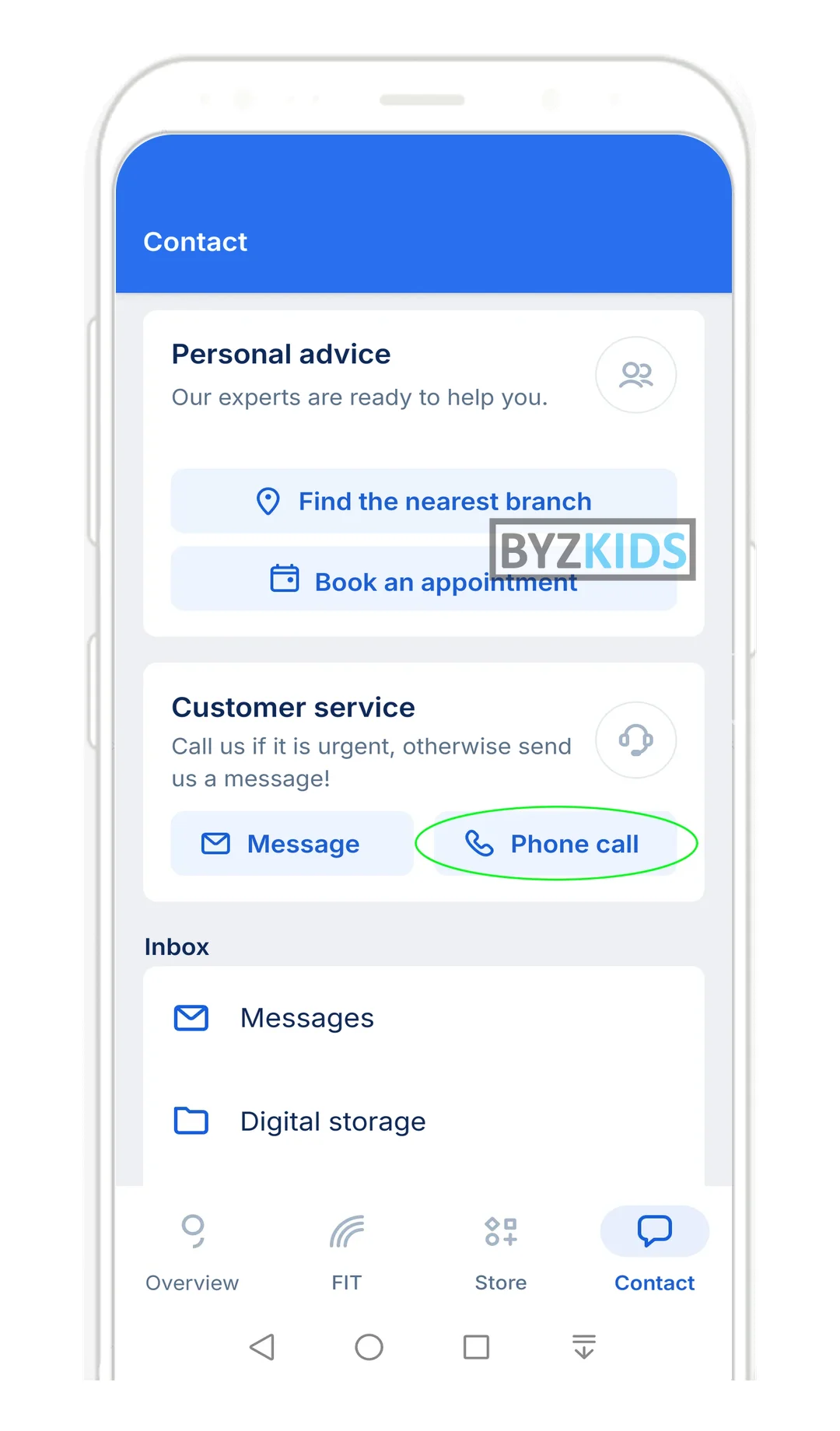
- Erste Bank Hungary (HU): identified call to the bank from George, no verification questions
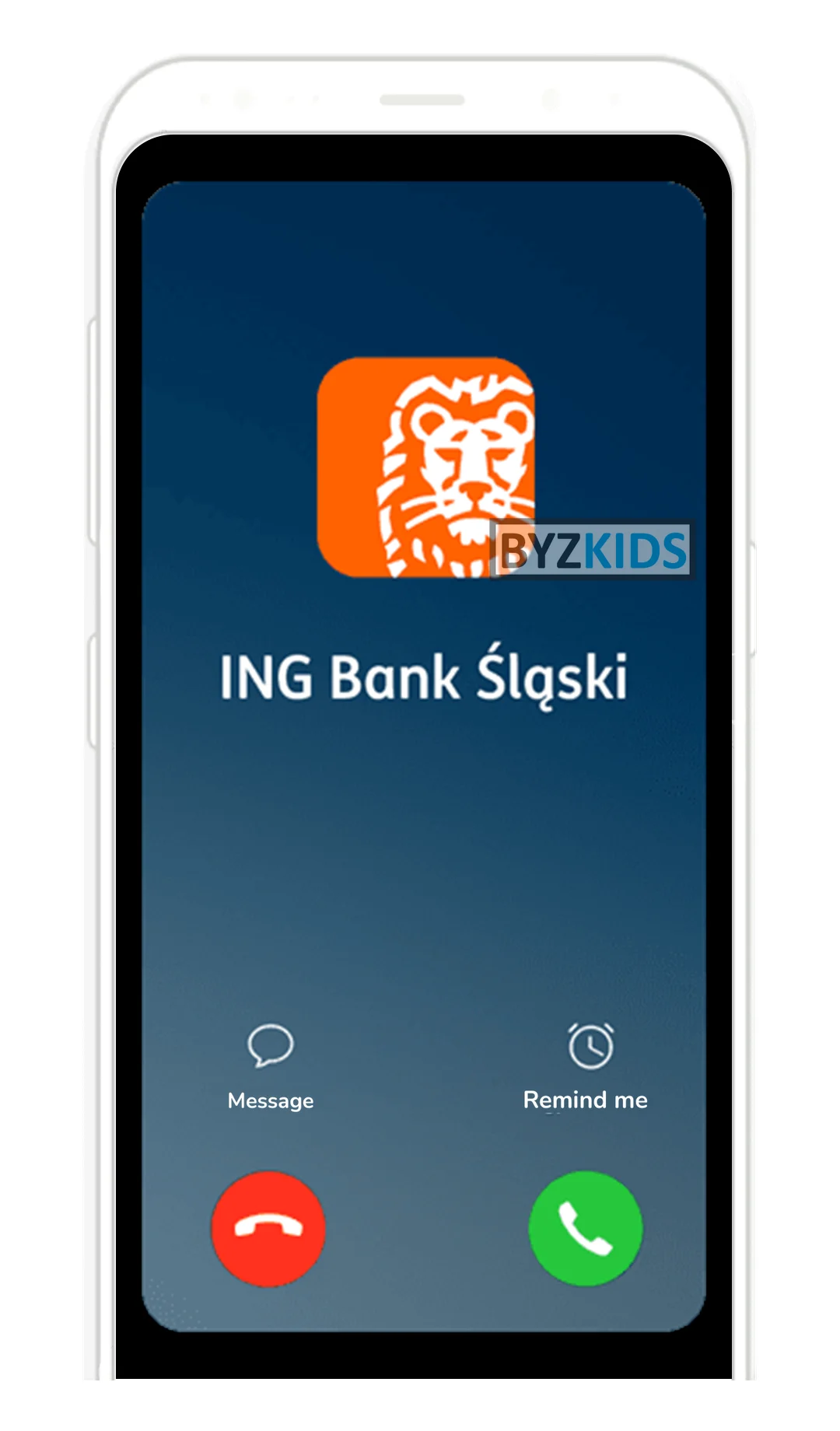
- ING Bank Śląski (PL): push shows the calling employee's name, or a suspicious-call warning
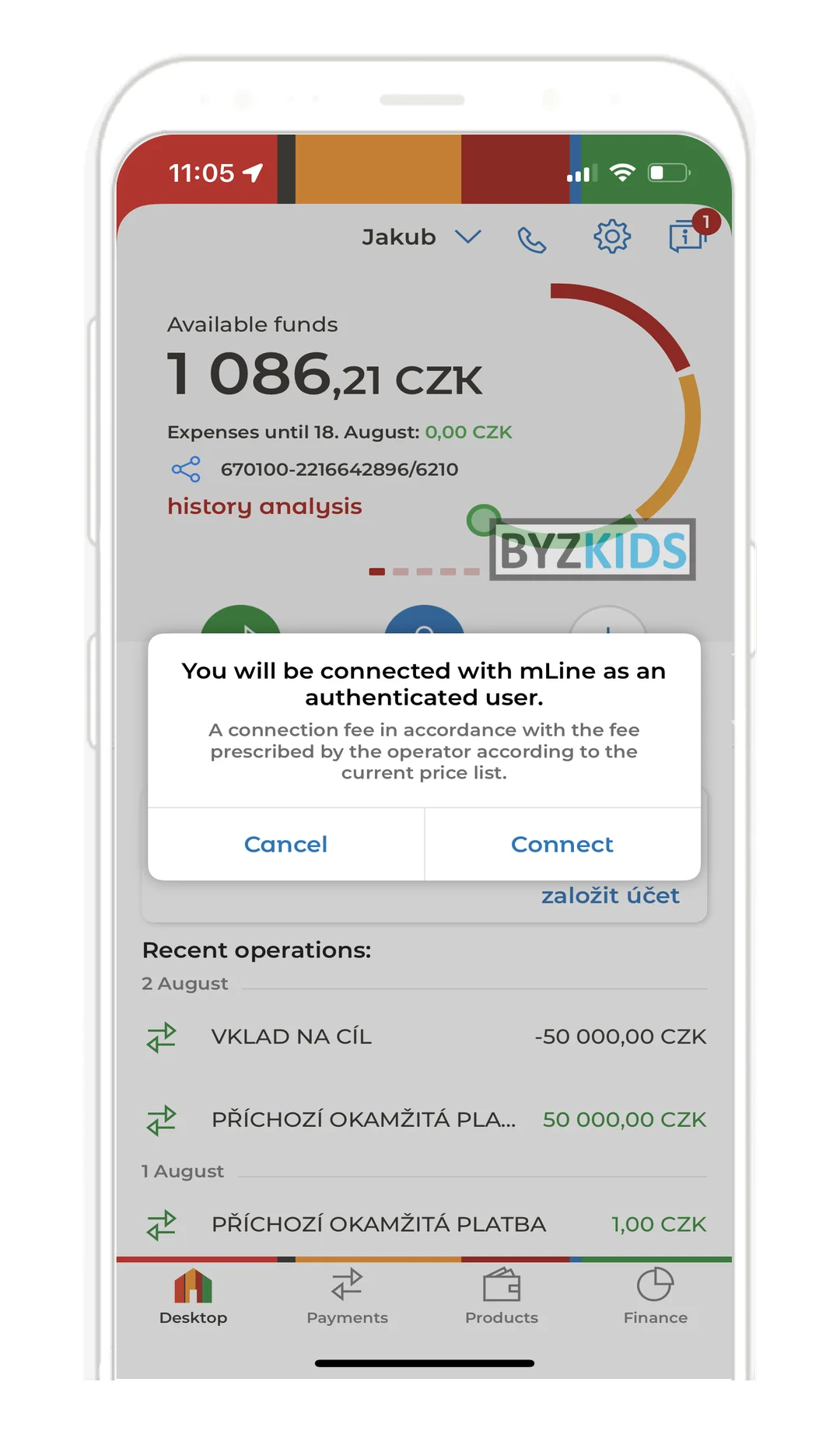
- mBank (CZ): in-app call to support, identity passed automatically
Authenticated in-app calling skips manual verification
by mBank
mBank CZE launches an in-app authenticated calling feature that connects users directly to mLine support without manual identity verification. The app passes authentication credentials automatically, eliminating repetitive security checks during the call. A confirmation dialog is shown before dialing, making the handoff transparent and the support experience significantly faster.
Biometric pre-authentication for contact center calls
by Erste Bank Hungary
Erste Bank Hungary HUN launches biometric pre-authentication for in-app calls to its contact center via the George app. Users confirm their identity with mPIN or biometrics before the call connects, so agents receive a verified caller with a pre-selected topic — eliminating security questions entirely. The key differentiator is the seamless handoff between digital identity verification and live agent support, reducing friction and phishing risk simultaneously.
Real-time push verification for inbound bank calls
by ING Bank Śląski
ING Bank Śląski POL launches real-time call verification in its Moje ING app, sending customers a push notification with the consultant's name whenever an ING employee initiates a call. If no matching call record is found, the app immediately flags the incoming call as suspicious. The feature gives users a clear, first-ring signal to hang up on fraudulent impersonators before any conversation begins.
4.4 Flagged Payment Reply: Florence Bank
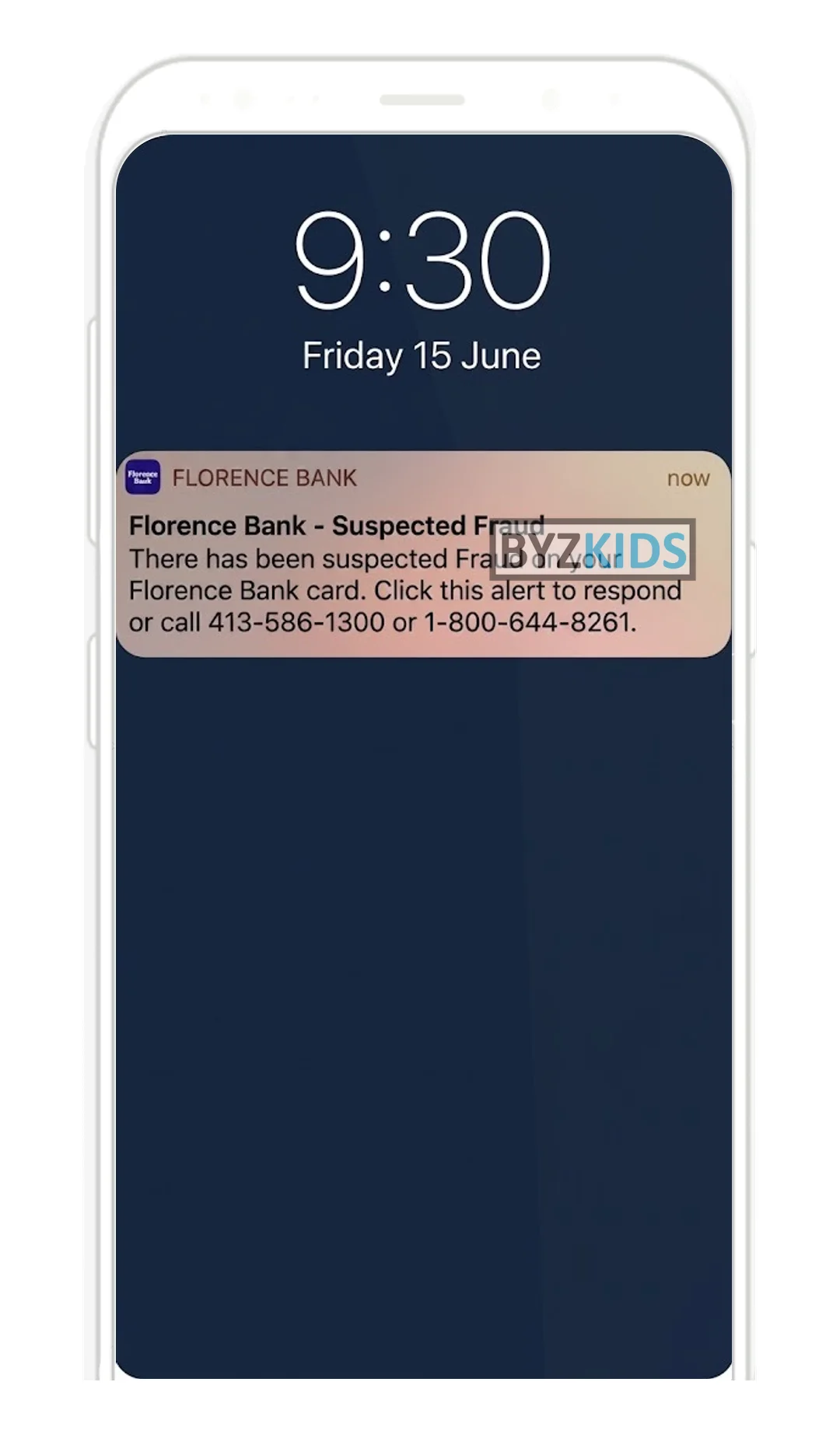
A fraud alert that asks the customer to call back loses minutes. An instant push on a flagged card payment that the customer confirms or rejects in one tap, with sensitive details kept off the lock screen, stops fraud while it is still pending. Florence Bank (US) ties this to its FraudDetect service.
Real-time fraud alert with in-app response
by Florence Bank
Florence Bank USA launches a real-time push notification system tied to its FraudDetect service that instantly alerts customers when a suspicious debit card transaction is flagged. Customers can respond directly in-app via the notification or choose to call a dedicated phone line, with separate numbers for business and after-hours support. A key security differentiator is that sensitive transaction details are deliberately withheld from the lock screen, reducing exposure of financial data to bystanders.
5. Recover
Recover is the weakest stage in the market and in our own benchmark of 100+ banking apps. Scammed customers are handed a phone number and a letter weeks later. Under PSR the reimbursement decision becomes a product moment, and the first patterns show what the in-app version looks like.
5.1 Report from the Transaction: Lloyds, Starling Bank
Customers do not know whether a bad payment is fraud or a dispute, and the wrong form costs days. Starting the report from the payment itself, with plain definitions that route the case to the right team from the first tap, files it correctly without a call.
What to copy:
- Lloyds (UK): defines fraud versus dispute before the first question
- Starling Bank (UK): three plain choices on the payment: dispute, report fraud, goods not received
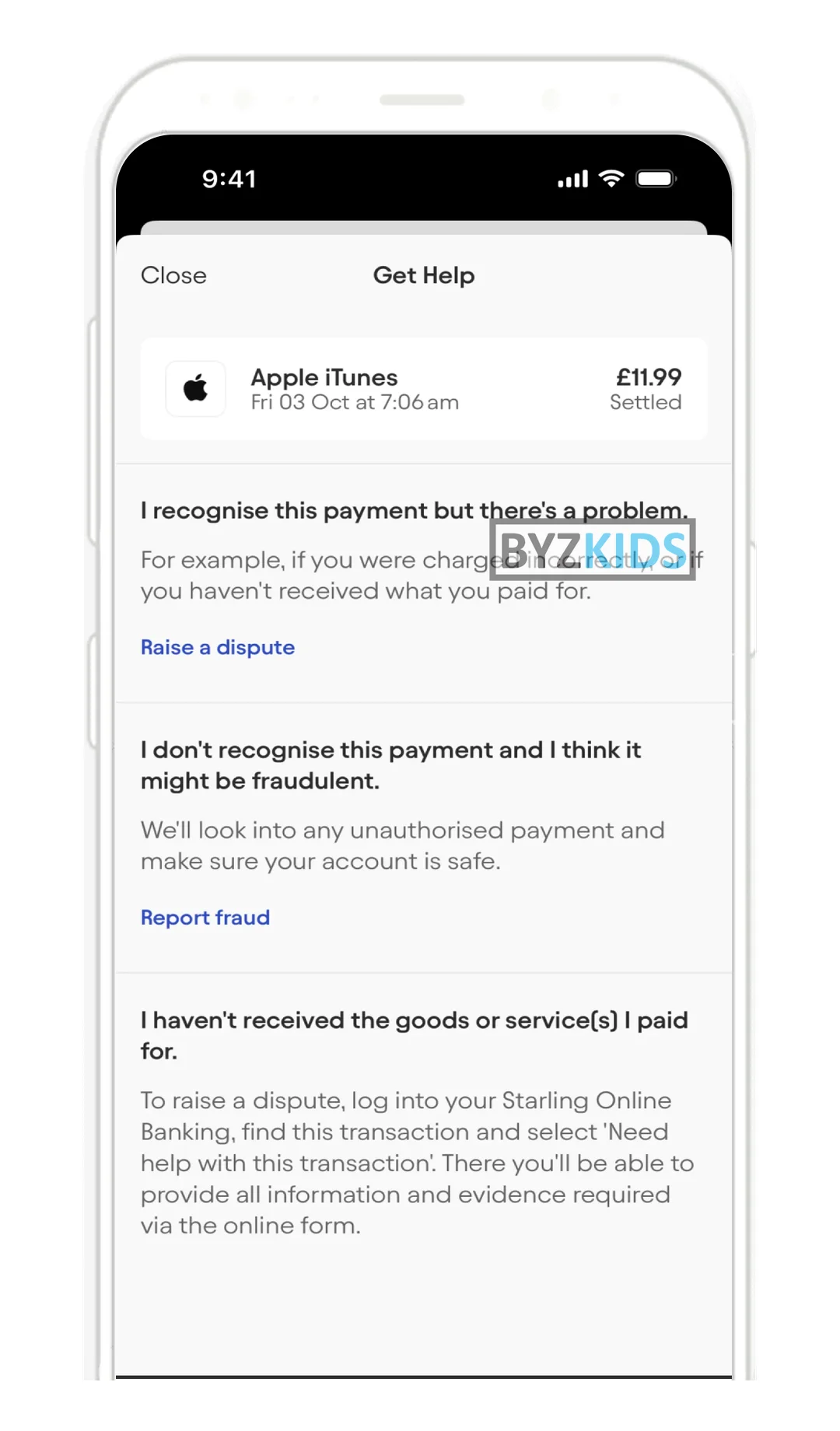
Contextual help screen embedded in payment transactions
by Starling Bank
Starling Bank GBR launches a contextual Get Help screen embedded directly within every payment transaction. The feature presents users with three clear options — raise a dispute, report fraud, or flag goods not received — eliminating ambiguity in the claims process. By routing users to the right claim type straight from the transaction view, Starling reduces misfiled claims and accelerates account protection.
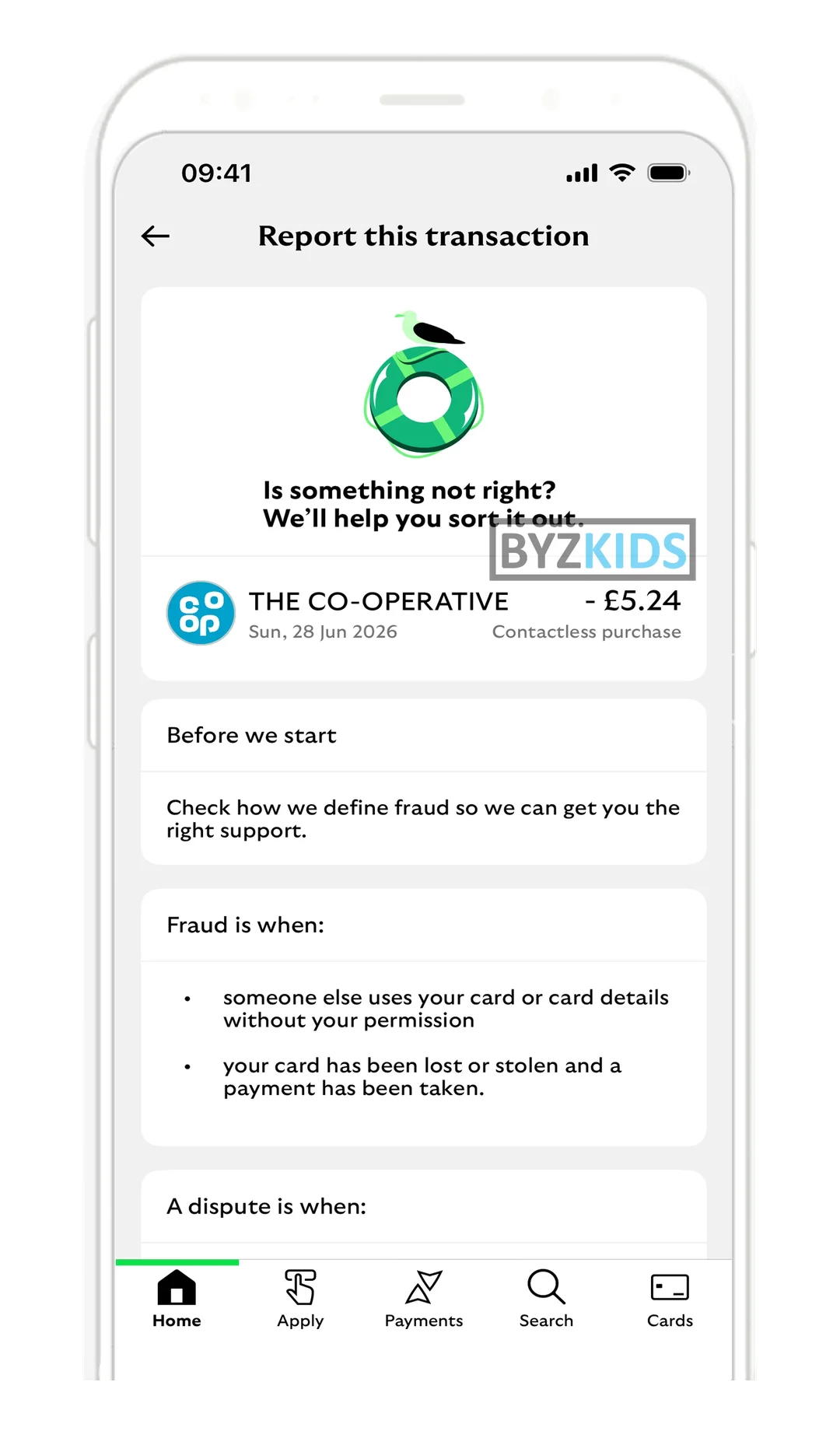
In-app transaction fraud vs dispute smart routing
by Lloyds Bank
Lloyds Bank GBR launches in-app payment reporting that lets customers flag an issue directly from the transaction detail screen. The flow opens with a plain-language explanation of the difference between fraud and a dispute, ensuring users select the correct category from the first tap. Smart routing then files the case with the appropriate team automatically, eliminating unnecessary transfers, callbacks, and resolution delays.
5.2 Dispute Status Timeline: Cash App
After a report, silence is what drives customers back to the phone. A dated timeline on the transaction, showing the case is in review and when the next update will come, answers the question before it is asked. Cash App (US) shows this on every dispute; it is the in-app status a PSR reimbursement decision will need.
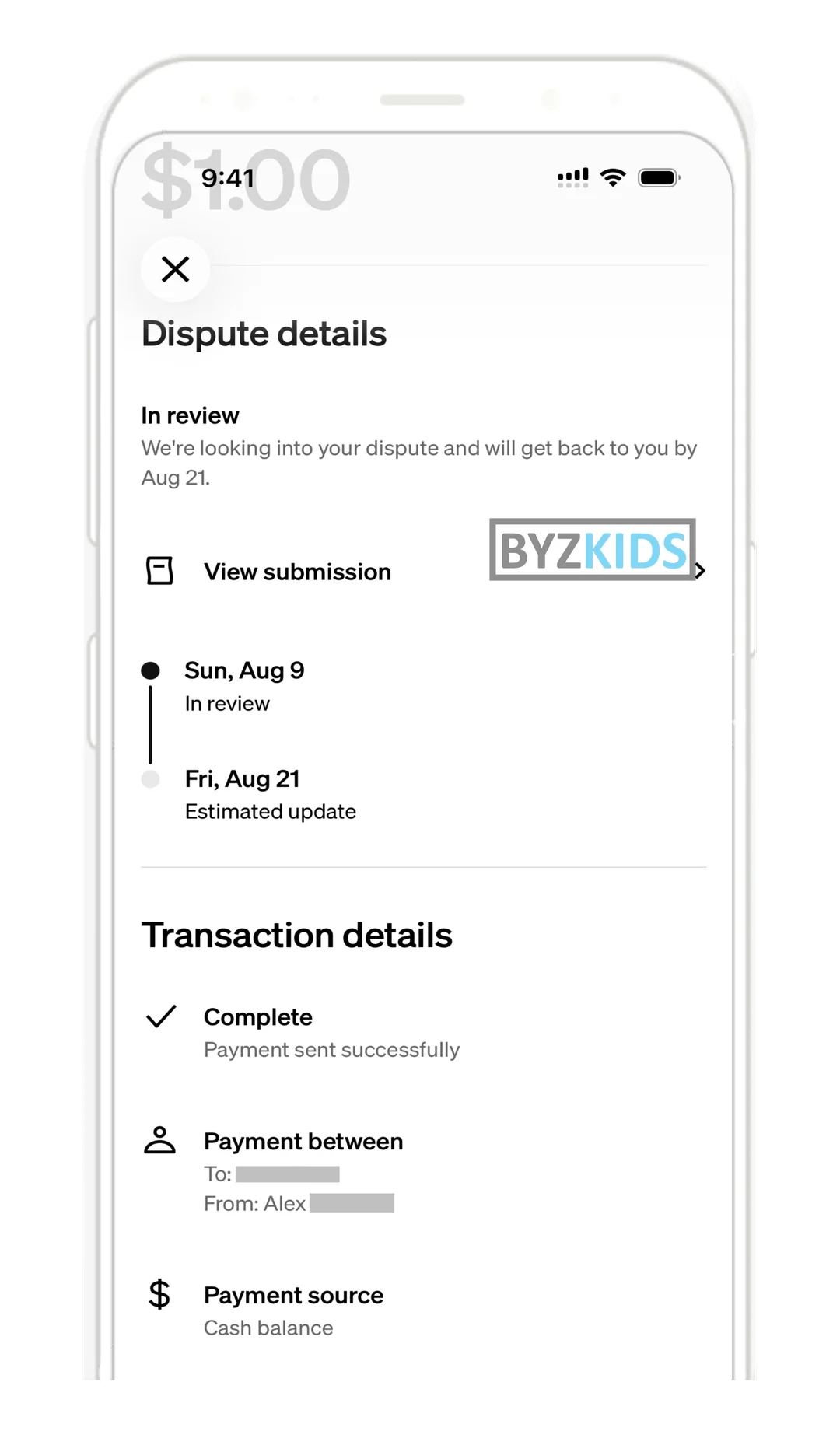
Transparent dispute tracking with timeline resolution
by Cash App
Cash App USA launches a transparent dispute tracking screen that displays case status, a dated timeline, and an estimated resolution date for every open dispute. The feature proactively surfaces progress to users without requiring them to contact support, directly addressing the most common source of post-dispute anxiety. By making case visibility a default part of the experience, Cash App reduces inbound support contacts while improving user trust during sensitive financial moments.
130%: Where You Beat the Market
100% brings you level with the strongest apps in the market. 130% is where you pass them. Three concepts from the framework above still leave real friction for your customers, and each one is something we would build differently.
Payee Name Check with a Clear Verdict | ANZ Plus, Monzo
Gap: legitimate payers get false alarms on diacritics and company suffixes
KPI to improve: lower drop-off at the payee check step
One-Tap Emergency Brake | mBank, Wise
Gap: freezing takes one tap, unfreezing still takes a phone call
KPI to improve: fewer support calls per scam case
Report from the Transaction | Lloyds, Starling Bank
Gap: the case is filed, then the customer hears nothing until a letter arrives
KPI to improve: higher share of scam cases handled in-app
150%: Where the Market Is Heading
The Warn and Stop stages still rely on the customer acting alone, in real time, against a professional script. Three shifts will change that in the next wave.
Cooling-Off with a Pressure Check
Banks will add a short, explained pause to high-risk first transfers, unlocked only after the customer confirms that nobody is instructing them on the phone. Crypto wallets already enforce this, and Baltic banks are discussing cooling-off delays for unusual transfers. Under PSR liability, a well-designed pause becomes cheaper than the reimbursement it prevents.
Bank and Telco Share the Call Context
Operators already sell banks network signals that show when a customer is on a call during a payment. The next step puts that context on the customer's own screen: the transfer warning names the call, how long it has lasted and whether the number is flagged, instead of a generic caution.
An AI Scam Coach Inside the Payment
Instead of a static checklist, the app asks the questions a fraud agent would ask, adapts to the answers and explains its concern in plain language. The conversation replaces the phone call to the fraud team for the moments that matter most.
CEE Banks: Scam Protection Examples at a Glance
Verified, public examples from banks in Central and Eastern Europe, mapped to the Trust Loop stage they serve.
| Bank | Country | Pattern | Stage | Evidence |
|---|---|---|---|---|
| mBank | Poland | Security checker of safety rules | Harden | Byzzard innovation card |
| Erste Bank Austria (George) | Austria | Device security check | Harden | source |
| mBank | Czech Republic | Instant alert on new-device pairing | Harden | Byzzard innovation card |
| PKO Bank Polski (IKO) | Poland | Selfie and ID check before risky transfers | Harden | source |
| Bank Pekao (PeoPay) | Poland | Opt-in behavioural biometrics | Harden | source |
| UniCredit | Czech Republic | Pre-emptive phishing wave push | Educate | Byzzard innovation card |
| Moneta | Czech Republic | Full-screen scam overlay before acting | Warn | Byzzard innovation card |
| Luminor | Latvia | Verification of Payee: match, close match, no match | Warn | source |
| mBank | Poland | 'You are not talking to mBank' warning during a call | Warn | source |
| mBank | Poland | One-tap block of all new outflows | Stop | source |
| OTP Bank (Utalasor) | Hungary | Trusted person alerted on large transfers | Stop | source |
| ING Bank Śląski | Poland | In-app check that ING is really calling | Stop | source |
| Erste Bank Hungary (George) | Hungary | Call identifier pushed into the app | Stop | source |
| Santander Bank Polska | Poland | Self-service card unblock with flagged payments | Recover | source |
Glossary
| Term | Meaning |
|---|---|
| APP fraud | Authorised push payment fraud: the customer is manipulated into sending the payment themselves. |
| Verification of Payee (VoP) | A name check on the payee before a transfer is confirmed. |
| Close match | A VoP result where the name is similar but not exact; the registered name is shown. |
| Scam call detection | The app notices an active phone call during a risky action and warns the customer. |
| Dynamic friction | Extra steps added only when risk signals are present. |
| Cooling-off | A deliberate delay on a high-risk payment that gives the customer time to think. |
| Account takeover | A fraudster gains control of the customer's account or app. |
| Trusted contact | A person the customer nominates to see or question large transfers. |
Related Blueprints
- Mobile Account Opening in Banking Apps →: identity checks at onboarding, which this blueprint deliberately leaves out
- New Customer Activation →: the first 72 hours, when security setup and biometric approval are easiest to switch on
- AI Interface Layer in Banking and Lending Apps →: the assistant layer where an AI scam coach would live
Sources
- EBA and ECB, 2025 Report on Payment Fraud: EUR 2.2 billion credit transfer fraud in 2024, up 16% →
- ECB, Instant Payments Regulation: VoP deadline 9 July 2027 for non-euro member states →
- Norton Rose Fulbright, PSD3 and PSR from provisional agreement to 2026 readiness →
- Open Banking Tracker, PSD3 and PSR readiness guide: adoption and application timeline →
- ERR News, Swedbank Estonia on fraud pressure and cooling-off delays →
- Byzkids, In-app security tools in banking benchmark (100+ apps), internal
Frequently asked questions
Related blueprints
Book a demo for free
Want to experience whole Byzzard innovation hub?
Get access to 4,000+ innovations, blueprints on various topics and our closed AI model APEX for free.